Aidan supports three carriers: Twilio, Vonage, and Telnyx. Each shines in different markets and price brackets. This guide will help you pick the right one for every client.
Quick Recommendation: - 🇺🇸 US/Canada traffic? Use Twilio (best
reliability and features) - 🌍 International traffic? Use Vonage
(per-second billing saves money) - 💰 Cost-conscious international? Use
Telnyx + Twilio combo (best rates in AU/UK/NZ/Europe)
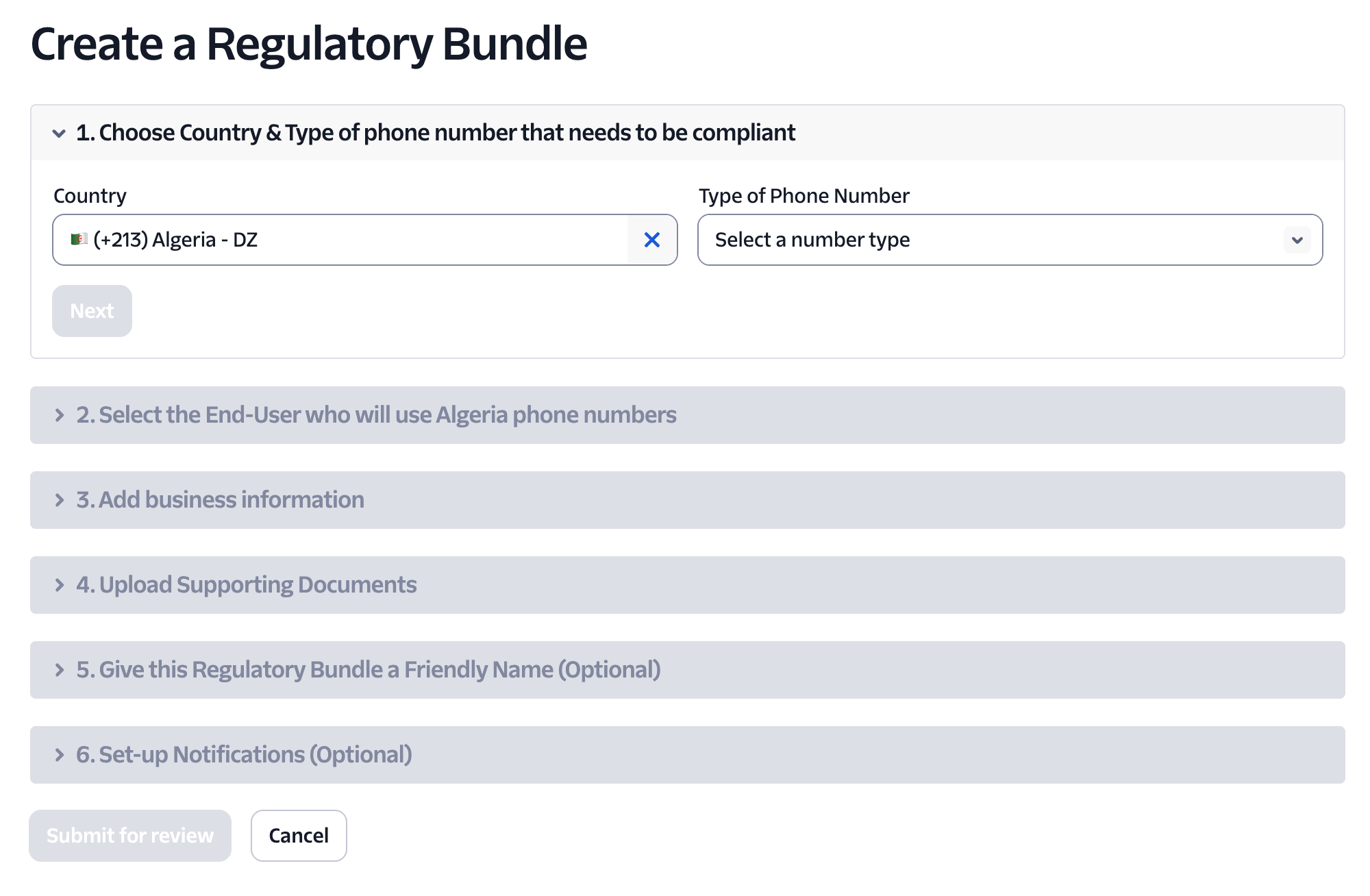
Many countries require proof-of-business before you can purchase phone numbers. Twilio calls this a “regulatory bundle.”
US/Canada toll-free and local numbers typically don’t require bundles.
Mobile numbers in most countries (including AU, UK, NZ) do require
compliance documentation.
1
Navigate to Regulatory Compliance
In the left menu choose Phone Numbers → Regulatory Compliance
2
Create Bundle
Click Create Bundle and fill in: - Country: Select your target
country - Number Type: Mobile, Local, or Toll-Free - Business Type:
Independent software vendor (or appropriate category)
3
Upload Documents
Twilio typically asks for: - Business name - Business address -
Business registration number (ABN for AU, EIN for US, Companies House
for UK, NZBN for NZ) Accepted documents: - Utility bills - Lease
agreements - Business registration certificates - Tax documents Each file
must show at least two of the required data points; upload multiple files if
needed. Registry Links: - ASIC
(Australia) - Companies House
(UK) - New
Zealand Companies Office
4
Submit and Wait
Submit; approval usually takes 24-48 hours depending on the country
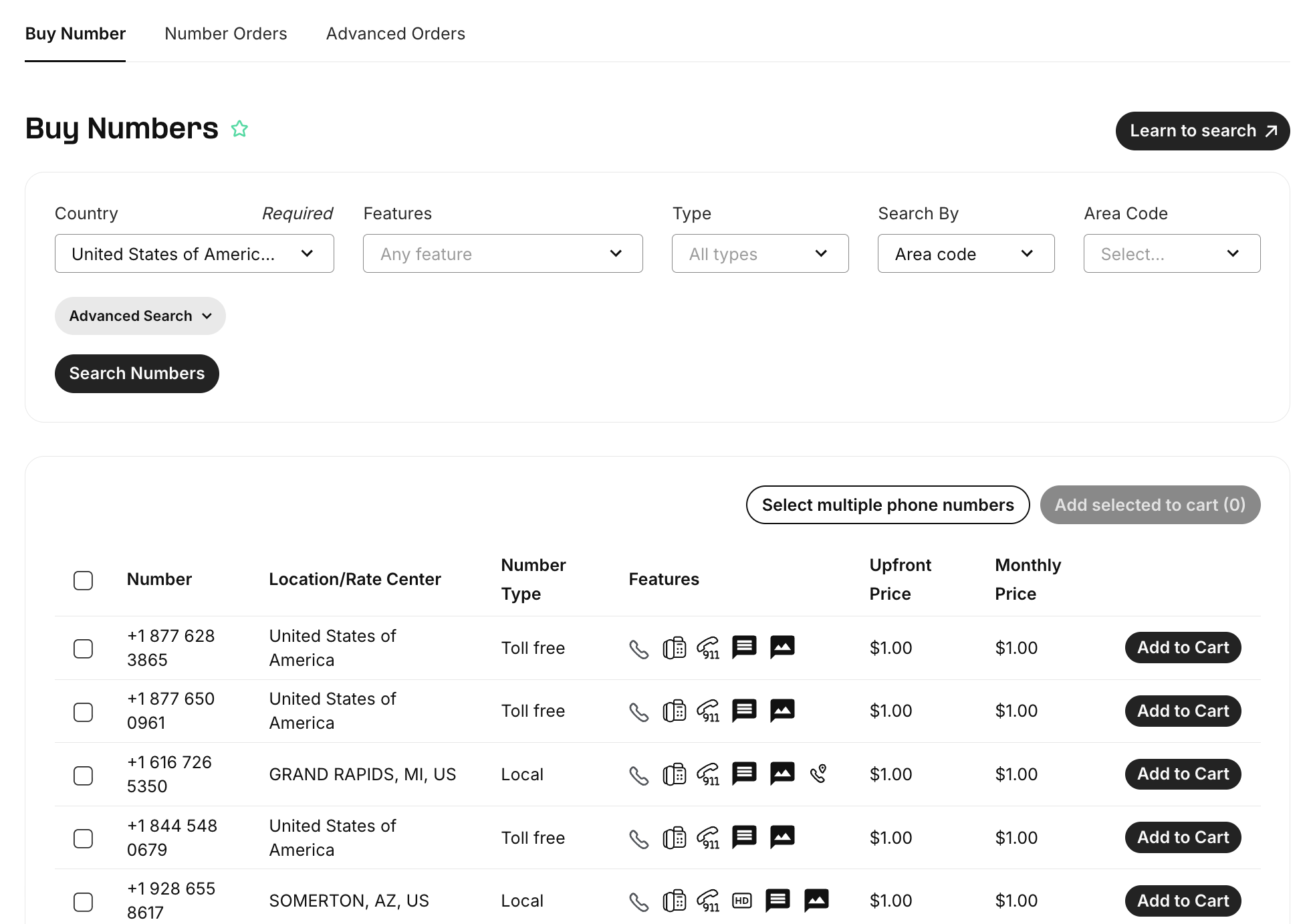
After the bundle is approved (or immediately for US/Canada), go to Phone
Numbers → Buy a number
2
Filter by Country and Capabilities
Filter for your target country and Capabilities = Voice & SMS
3
Choose Your Number
Select a number that matches your needs: - Mobile (AU: 614, UK: 447, NZ:
642) - Best for SMS + voice - Local (US/Canada area codes) - Geographic
presence - Toll-free (US: 800/888, AU: 1800, UK: 0800) - Free for
callers
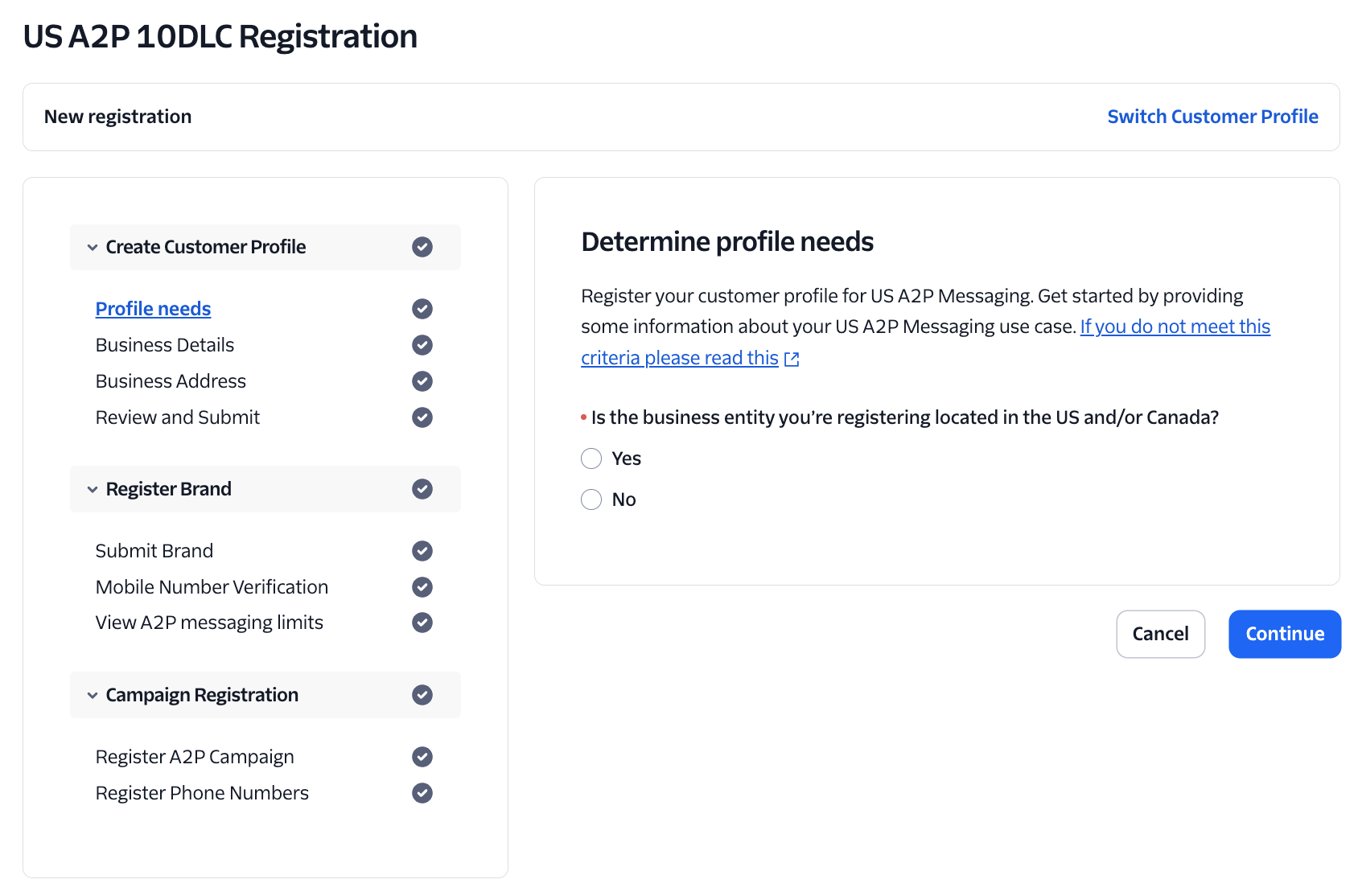
If you’re sending SMS messages to US numbers, you must register for A2P (Application-to-Person) messaging. This is a US regulation to reduce spam.
Required for US SMS: Without A2P registration, your SMS messages to US
numbers will be blocked or heavily throttled (limited to ~5 messages per
minute).
A2P (Application-to-Person) registration is required by US carriers for business SMS messaging. It verifies that you’re a legitimate business sending approved content.Two Options:
Standard Registration (Recommended)
Timeline: 4-6 weeks Cost: ~$15-50 one-time fee Throughput: Up to 4,500 messages per minuteRequirements:
Define your use case (appointment reminders, customer service, marketing, etc.)Submit sample message templates
5
Wait for Approval
Approval typically takes 4-6 weeks. You’ll receive email updates on progress
6
Assign Numbers
Once approved, assign your US numbers to the campaign
Start the A2P process immediately after buying your number. The 4-6 week wait is unavoidable, so don’t delay!
Low Volume (Quick Start)
Timeline: Instant Cost: Free Throughput: Only 5-10 messages per minuteIf you’re just testing or sending very low volumes, you can skip full A2P registration. However, your messages will be heavily throttled.
Not suitable for production: Low volume limits make this impractical for real campaigns. Only use for testing or tiny-scale operations.
If you’re not sending SMS to US numbers (e.g., AU → AU, UK → UK), you can skip A2P registration entirely. It’s only required for US SMS traffic.
International SMS: Other countries have their own regulations, but most
don’t require pre-registration like the US does. Always check local
requirements for your target market.
Vonage bills by the second and can be cheaper than Twilio outside the US, but the onboarding is more manual. Follow these steps to secure a number and connect it to Aidan.
In the left sidebar, click Phone Numbers → Buy Numbers
2
Search for Number
Choose the target country and search
3
Request (Not Buy)
Click Request; instead of instant purchase, the portal creates a ticket
4
Provide Documents
A Vonage rep emails you for supporting documents—usually: - Proof of
business name and address (utility bill, lease, ASIC extract, etc.) -
Business registration ID (ABN, Companies House number, EIN, etc.)
5
Wait for Approval
Email the files back; approval typically lands within 24–48 hours The number
appears in your dashboard under My Numbers once approved and billed
Telnyx often offers lower per-minute rates than Twilio in many international markets (especially AU, UK, and Europe), but it lacks GoHighLevel SMS integration and native voicemail detection.
Recommended Strategy
Use Twilio for inbound and SMS (so everything lands in GoHighLevel) Use
Telnyx for outbound voice, masking the calls with the same Twilio number
through “verified caller ID” This gives you the best of both worlds: Twilio’s
reliability + Telnyx’s pricing.
Popular in: Australia, UK, New Zealand, and European markets where Telnyx
rates are significantly lower than Twilio.
Leave FQDN empty and scroll down to Outbound Calls Authentication -
Set a unique Username (e.g., outbox_user) - Set a strong Password
Click Next
4
Configuration
Leave this screen as the defaults and click Next
5
Inbound
Leave this screen as the defaults and click Next
6
Outbound Settings
Configure your outbound call settings: - Localization Country – Select
the country you’ll be calling (e.g., Australia, US, UK) - Caller ID
Override – Paste the Twilio number you purchased in Step 1 This makes
outbound calls display your Twilio number instead of the raw Telnyx number.
7
Configure Voice Profile
Create or select a Voice Profile and whitelist the destinations you plan
to dial
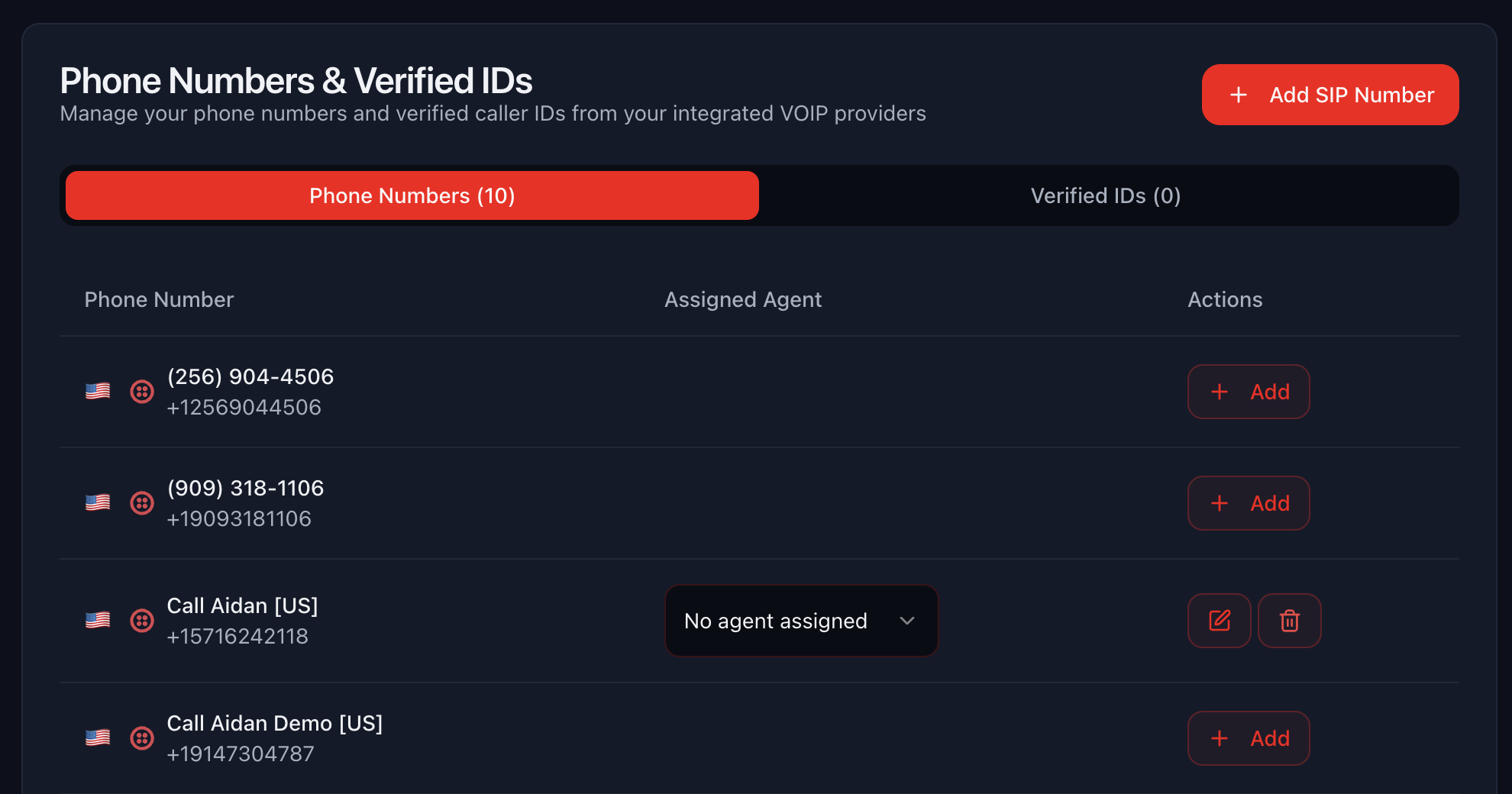
In Aidan, go to Company Settings → Phone Number tab
2
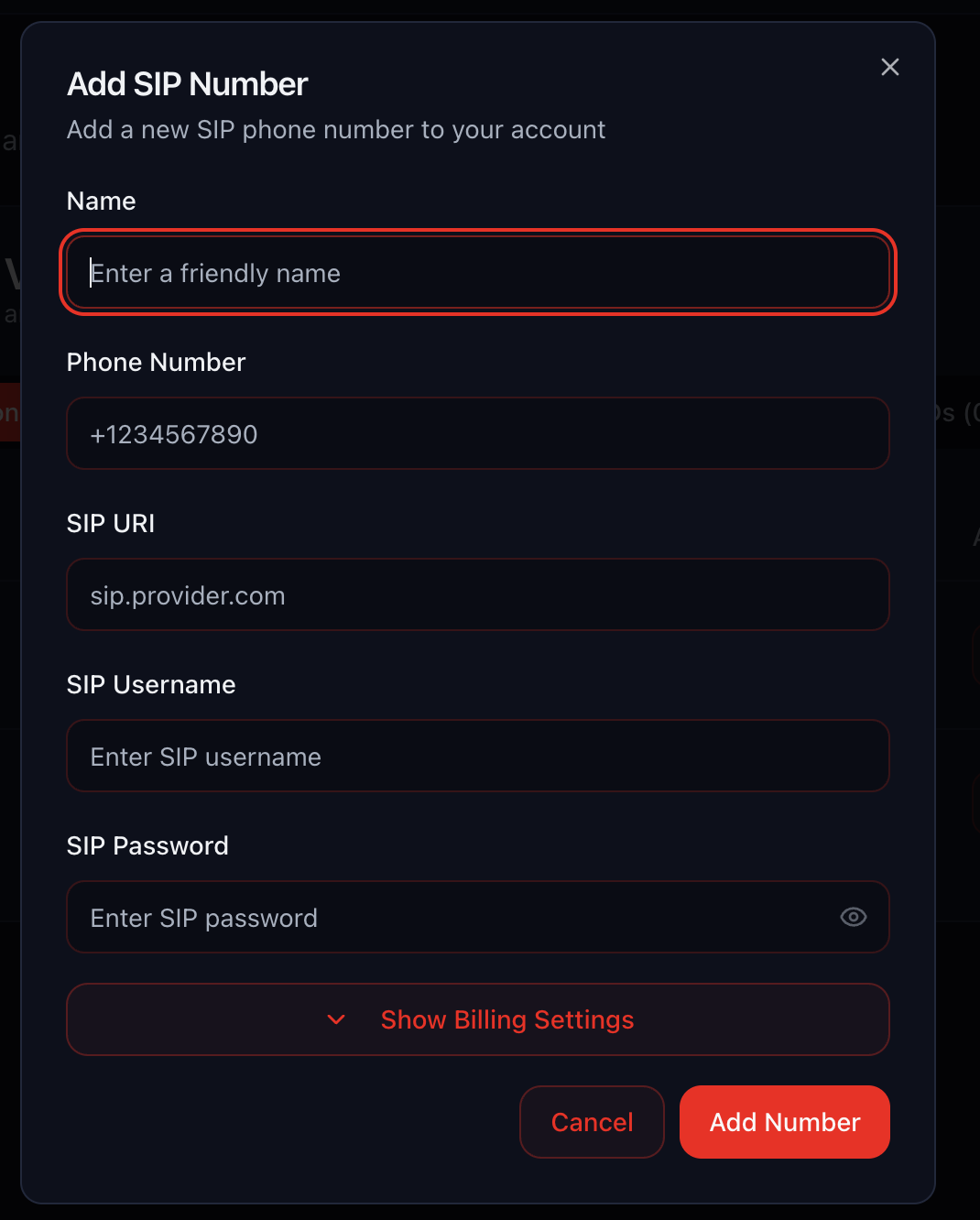
Add SIP Number
Click Add SIP Number
3
Configure SIP Details
Fill in the connection details: - Name – Label for this number (e.g.,
“Client Name - Telnyx Outbound”) - Phone Number – The Telnyx number you
purchased (e.g., +61412345678) - SIP Domain – sip.telnyx.com (or
192.76.120.10 if that doesn’t work) - SIP Username – The username you
set in Step 3 - SIP Password – The password you set in Step 3
4
Configure Billing
Set your billing preferences: - Rebilling – Toggle ON if you want to
charge clients for usage, OFF if you’re covering costs - Outbound Cost –
Set to 0.033 (3.3¢ per minute for AU, adjust for other countries) -
Billing Type – Keep Bill per minute ON (Telnyx charges by the
minute)
5
Save
Click Save to add the number to your account
Rebilling: If enabled, Aidan will automatically charge your clients based
on their call usage at the rate you set.
✅ All outbound calls travel via Telnyx (typically 40-60% cheaper than Twilio in most markets)
✅ The callee’s phone displays the familiar Twilio number
✅ Inbound calls and SMS still hit GoHighLevel through TwilioEstimated Savings:
Australia: ~3.3¢/min vs ~7¢/min (save ~50%)
UK: ~2¢/min vs ~3¢/min (save ~33%)
Europe: ~2-3¢/min vs ~4-5¢/min (save ~40%)
Perfect for international teams! You get Twilio’s reliability for SMS
and inbound, with Telnyx’s pricing for outbound calls. The savings really add
up on high-volume campaigns.
Don’t try to set up all three at once. Pick the best fit for your primary market and master it first.
US/Canada clients? Twilio
International clients (per-second billing)? Vonage
Cost-conscious international (AU/UK/NZ/Europe)? Telnyx + Twilio combo
Use Sub-Accounts for Client Separation
Create separate sub-accounts (Twilio) or labeled numbers (Vonage/Telnyx) for
each client. This makes billing tracking and troubleshooting 10x easier.
Test Before Going Live
Always send test calls before launching campaigns: 1. Test inbound and
outbound 2. Verify caller ID displays correctly 3. Check SMS delivery (if
applicable) 4. Confirm call quality and latency
Monitor Your Balance
Set up billing alerts in your provider dashboard. Running out of credits
mid-campaign is embarrassing and costly.
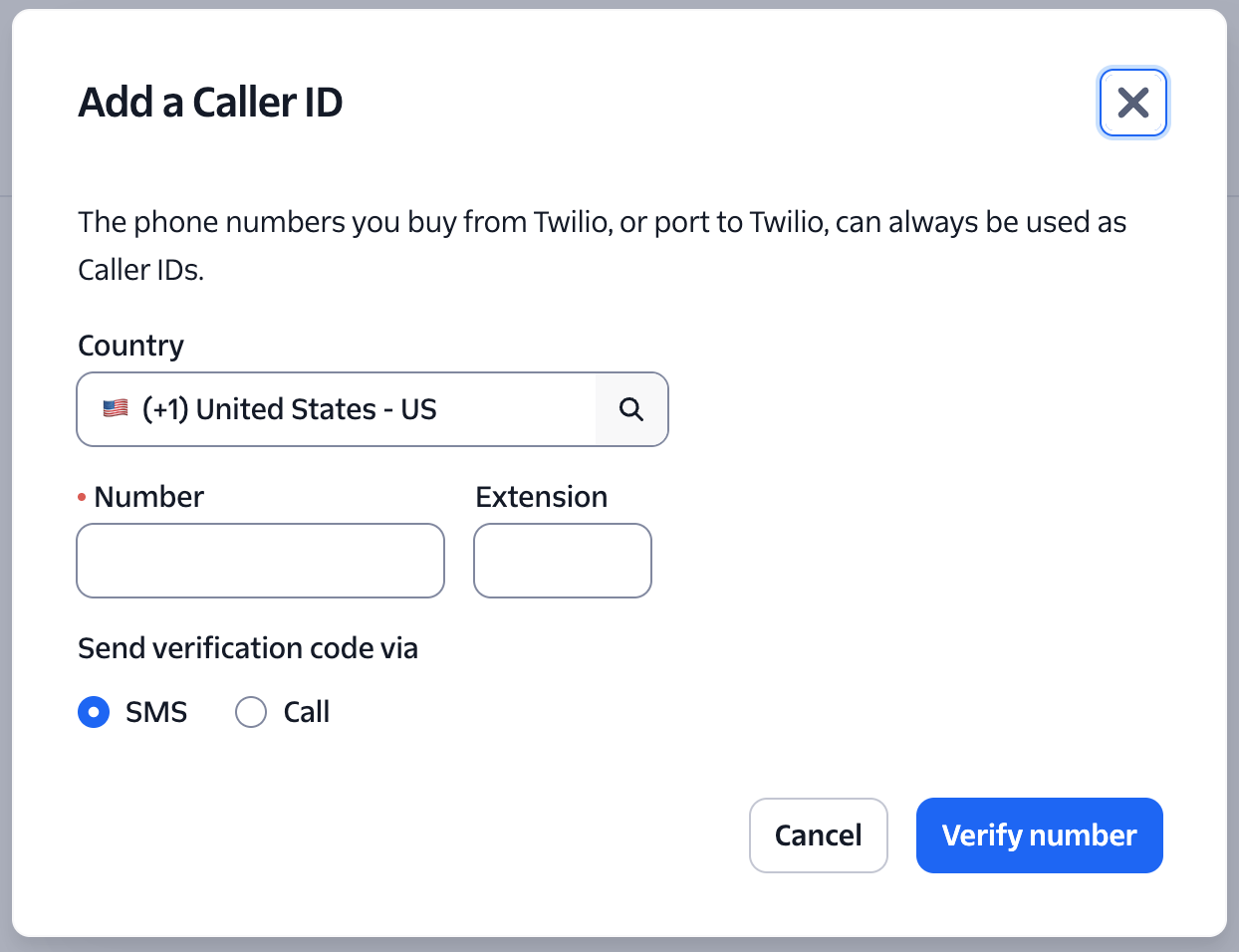
Document Your Verified Caller IDs
Keep a spreadsheet of which client uses which caller ID, especially if you’re managing multiple masked setups.
Problem: You’ve bought a number but it’s not showing up.Solutions:
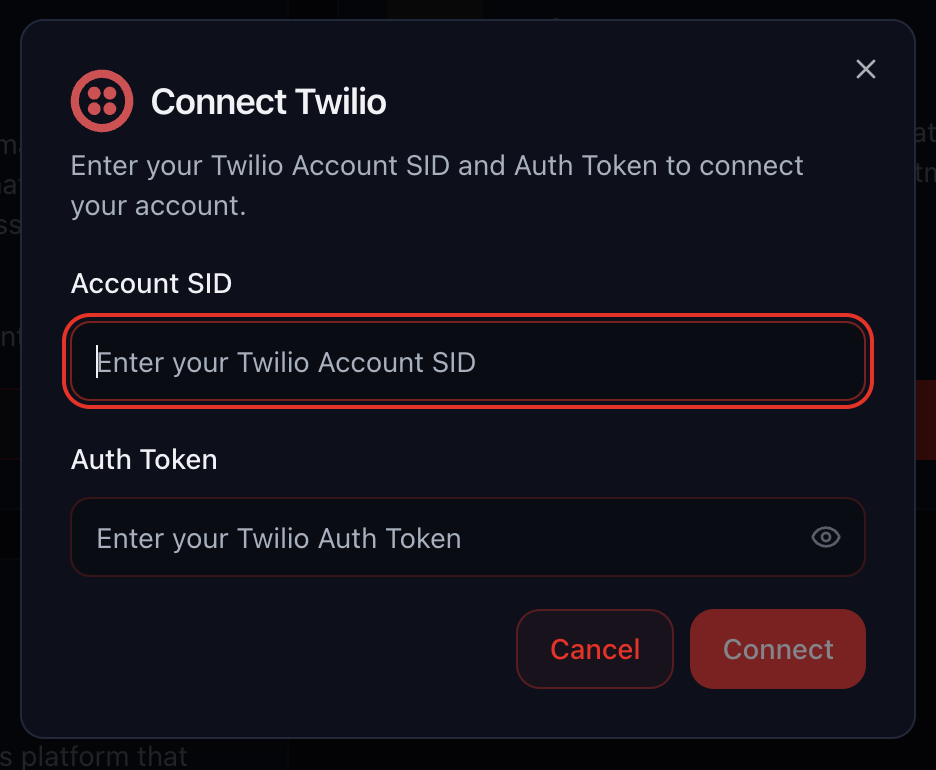
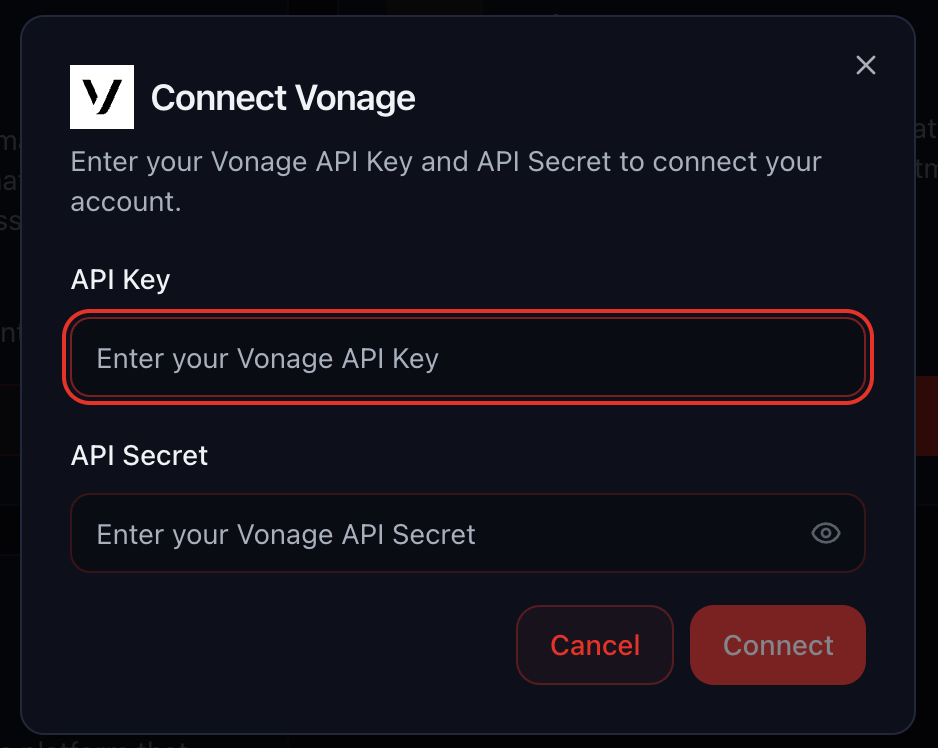
Double-check credentials (SID, Auth Token, API Key) are correct
Refresh the Aidan page
For Twilio, ensure you’re using the correct sub-account credentials
For Telnyx SIP, verify the SIP domain is correct (sip.telnyx.com or 192.76.120.10)
Calls Failing to Connect
Problem: Outbound calls aren’t connecting. Solutions: - Check
balance: Ensure your provider account has sufficient funds - Verify number
status: Some numbers need activation or compliance approval - Test with a
different number: Rule out number-specific issues - Check concurrency
limits: You may have hit your max simultaneous calls - Review error
logs: Aidan shows detailed error messages in Call Logs
Caller ID Not Displaying Correctly
Problem: The wrong number is showing on outbound calls. Solutions: -
Twilio: Verify the caller ID is properly verified in Verified Caller IDs -
Telnyx: Check the Caller ID Override is set correctly in the SIP trunk -
Both: Ensure you’ve selected the correct caller ID in Aidan when setting
up the campaign
SMS Not Working
Problem: Text messages aren’t sending or receiving. Solutions: -
Twilio only: SMS doesn’t work with Vonage or Telnyx in GoHighLevel -
Verify the Twilio number has SMS capability enabled - Check that the number is
properly connected to GoHighLevel - Ensure you have A2P 10DLC registration if
sending to US numbers
High Latency or Poor Call Quality
Problem: Calls have delays or sound choppy. Solutions: - Check your
internet connection: Voice requires stable bandwidth - Test from a
different location: Rule out local network issues - Try a different SIP
region: For Telnyx, switch to a closer POP - Contact provider support:
There may be routing issues on their end
Regulatory Bundle Rejected
Problem: Twilio rejected your compliance documents.Solutions:
Ensure documents show at least 2 of 3 required data points (name, address, registration number)
Use recent documents (under 3 months old)
Make sure text is legible (no blurry photos)
Upload multiple documents if one doesn’t cover all requirements
Check the rejection email for specific issues
A2P Registration Stuck or Rejected
Problem: Your A2P 10DLC registration is taking too long or was rejected.Solutions:If Stuck (over 6 weeks):
Contact Twilio support with your campaign ID
Check for any pending actions in the A2P dashboard
Verify your business EIN is valid and matches official records
If Rejected:
Review the rejection reason carefully
Common issues:
Sample messages look like spam or scams
Business website doesn’t match your description
Use case is unclear or too broad
EIN doesn’t match business name
Revise your campaign description to be more specific
Provide clearer sample message templates
Resubmit with corrections
Pro Tip: Be very specific in your campaign description. Instead of “marketing messages,” say “appointment reminders and booking confirmations for dental practice patients.”
US SMS Still Throttled After A2P
Problem: SMS messages are still slow even after A2P approval.Solutions:
Verify your phone number is actually assigned to the approved campaign
Check campaign status—it may show “approved” but still be processing
Allow 24-48 hours after approval for full throughput to activate
Review your campaign’s assigned throughput tier (some use cases get lower limits)
Contact Twilio if throttling persists beyond 48 hours
{"docsConfig":{"$schema":"https://mintlify.com/docs.json","theme":"mint","name":"Aidan","colors":{"primary":"#DD050E","light":"#DD050E","dark":"#DD050E"},"favicon":"https://mintcdn.com/aidan/OXXSgGv35zIqM21r/favicon.svg?fit=max\u0026auto=format\u0026n=OXXSgGv35zIqM21r\u0026q=85\u0026s=b655205c5355c37b653e9c24382b7b7f","logo":{"light":"https://mintcdn.com/aidan/5f0YMxiufk0VICtP/logo/logo-dark.png?fit=max\u0026auto=format\u0026n=5f0YMxiufk0VICtP\u0026q=85\u0026s=5eb2415aefd08ad847d634b5e4ab077c","dark":"https://mintcdn.com/aidan/5f0YMxiufk0VICtP/logo/logo-light.png?fit=max\u0026auto=format\u0026n=5f0YMxiufk0VICtP\u0026q=85\u0026s=a5dd3def6794822a5508bdba4586aa37"},"navbar":{"links":[{"label":"Support","href":"mailto:support@callaidan.com"}],"primary":{"type":"button","label":"Dashboard","href":"https://app.callaidan.com"}},"footer":{"socials":{"x":"https://x.com/getoutbox_ai","linkedin":"https://www.linkedin.com/company/outbox-ai/","facebook":"https://www.facebook.com/outboxai","instagram":"https://www.instagram.com/outboxai"}},"styling":{"latex":false},"navigation":{"global":{"anchors":[{"anchor":"Documentation","href":"https://docs.callaidan.com","icon":"book-open-cover"}]},"pages":[]}},"deployment":{"deploymentMetadataValue":{"subdomain":"aidan","hasAudioNarration":false,"actualSubdomain":"aidan","customDomains":["docs.callaidan.com"],"gitSource":{"type":"github","owner":"call-aidan","repo":"docs","deployBranch":"main","contentDirectory":"","isPrivate":true,"mountPath":"","label":""},"chroma":{"liveDeploymentHistoryId":"6acb29e792b099bee571cfe2","collectionId":"d31eac1a-34bf-4f00-8e7a-edd124911daf","schemaVersion":"v3","latestBuiltDeploymentHistoryId":"6acb29e792b099bee571cfe2"},"entitlements":{"AI_CHAT":{"status":"DISABLED"},"WEB_MCP":{"status":"DISABLED"},"NARRATION":{"status":"DISABLED"}},"buildId":"6acb29e792b099bee571cfe2","clientVersion":"0.0.3971","searchFilterCounts":[{"language":"default","tag":"API Reference","count":120},{"language":"default","tag":"Workflows","count":22},{"language":"default","tag":"CRM Opportunities","count":14},{"language":"default","tag":"Email Providers, Domains \u0026 Senders","count":14},{"language":"default","tag":"Documentation","count":11},{"language":"default","tag":"Get Started","count":11},{"language":"default","tag":"Company Settings","count":10},{"language":"default","tag":"Agent Tools","count":6},{"language":"default","tag":"Agent Endpoints","count":6},{"language":"default","tag":"Tools","count":6}]},"assistantConfig":{"enableStarterQuestions":false},"basePath":"","hasChatPermissions":false,"hasWebMcpPermissions":false,"toggles":[{"name":"kill-isr","enabled":true,"variant":{"name":"disabled","enabled":false,"feature_enabled":true},"impressionData":false},{"name":"agent-mintlify-slack","enabled":true,"variant":{"name":"disabled","enabled":false,"feature_enabled":true},"impressionData":false},{"name":"editor-v7-file-tree","enabled":true,"variant":{"name":"disabled","enabled":false,"feature_enabled":true},"impressionData":false},{"name":"agent-integrations-settings","enabled":true,"variant":{"name":"disabled","enabled":false,"feature_enabled":true},"impressionData":false},{"name":"automations-pr-grouping","enabled":true,"variant":{"name":"disabled","enabled":false,"feature_enabled":true},"impressionData":false},{"name":"custom-prefix","enabled":true,"variant":{"name":"disabled","enabled":false,"feature_enabled":true},"impressionData":false},{"name":"analytics-v7","enabled":true,"variant":{"name":"disabled","enabled":false,"feature_enabled":true},"impressionData":false},{"name":"user-flows-analytics","enabled":true,"variant":{"name":"disabled","enabled":false,"feature_enabled":true},"impressionData":false},{"name":"no-publish-flow","enabled":true,"variant":{"name":"disabled","enabled":false,"feature_enabled":true},"impressionData":false},{"name":"workos-onboarding","enabled":true,"variant":{"name":"disabled","enabled":false,"feature_enabled":true},"impressionData":false},{"name":"llms-txt-v2","enabled":true,"variant":{"name":"disabled","enabled":false,"feature_enabled":true},"impressionData":false},{"name":"pause-universal-search-reconcile","enabled":true,"variant":{"name":"disabled","enabled":false,"feature_enabled":true},"impressionData":false},{"name":"snapshot-serving-live","enabled":true,"variant":{"name":"disabled","enabled":false,"feature_enabled":true},"impressionData":false},{"name":"stripTemperatureMiddleware","enabled":true,"variant":{"name":"disabled","enabled":false,"feature_enabled":true},"impressionData":false},{"name":"per-site-search-delta","enabled":true,"variant":{"name":"disabled","enabled":false,"feature_enabled":true},"impressionData":false},{"name":"support-platform-pylon-zendesk","enabled":true,"variant":{"name":"disabled","enabled":false,"feature_enabled":true},"impressionData":false},{"name":"snapshot-serving","enabled":true,"variant":{"name":"disabled","enabled":false,"feature_enabled":true},"impressionData":false},{"name":"instant-rollback","enabled":true,"variant":{"name":"disabled","enabled":false,"feature_enabled":true},"impressionData":false},{"name":"granular-notifications-server","enabled":true,"variant":{"name":"disabled","enabled":false,"feature_enabled":true},"impressionData":false},{"name":"granular-notifications","enabled":true,"variant":{"name":"disabled","enabled":false,"feature_enabled":true},"impressionData":false},{"name":"editor-private-page-search","enabled":true,"variant":{"name":"disabled","enabled":false,"feature_enabled":true},"impressionData":false},{"name":"automations-fable","enabled":true,"variant":{"name":"disabled","enabled":false,"feature_enabled":true},"impressionData":false},{"name":"fixed-ai-action-pricing","enabled":true,"variant":{"name":"disabled","enabled":false,"feature_enabled":true},"impressionData":false},{"name":"automation-resolve-merge-conflict","enabled":true,"variant":{"name":"disabled","enabled":false,"feature_enabled":true},"impressionData":false},{"name":"scoped-publishing","enabled":true,"variant":{"name":"disabled","enabled":false,"feature_enabled":true},"impressionData":false},{"name":"mintql","enabled":true,"variant":{"name":"disabled","enabled":false,"feature_enabled":true},"impressionData":false},{"name":"page-level-analytics","enabled":true,"variant":{"name":"disabled","enabled":false,"feature_enabled":true},"impressionData":false},{"name":"editor-version-history-v2","enabled":true,"variant":{"name":"disabled","enabled":false,"feature_enabled":true},"impressionData":false},{"name":"editor-nav-generations","enabled":true,"variant":{"name":"disabled","enabled":false,"feature_enabled":true},"impressionData":false},{"name":"billing-page-v2","enabled":true,"variant":{"name":"disabled","enabled":false,"feature_enabled":true},"impressionData":false},{"name":"workspace-projects","enabled":true,"variant":{"name":"disabled","enabled":false,"feature_enabled":true},"impressionData":false},{"name":"assistant-v5","enabled":true,"variant":{"name":"disabled","enabled":false,"feature_enabled":true},"impressionData":false},{"name":"byok-sep-25","enabled":true,"variant":{"name":"disabled","enabled":false,"feature_enabled":true},"impressionData":false},{"name":"fork-pr-previews","enabled":true,"variant":{"name":"disabled","enabled":false,"feature_enabled":true},"impressionData":false},{"name":"revalidation-jwt","enabled":true,"variant":{"name":"disabled","enabled":false,"feature_enabled":true},"impressionData":false},{"name":"vite-origin","enabled":true,"variant":{"name":"disabled","enabled":false,"feature_enabled":true},"impressionData":false},{"name":"editor-agent-model-picker","enabled":true,"variant":{"name":"disabled","enabled":false,"feature_enabled":true},"impressionData":false},{"name":"billing-updated-9-15","enabled":true,"variant":{"name":"disabled","enabled":false,"feature_enabled":true},"impressionData":false},{"name":"workos-sso-scim","enabled":true,"variant":{"name":"disabled","enabled":false,"feature_enabled":true},"impressionData":false},{"name":"hobby-abuse-scan","enabled":true,"variant":{"name":"disabled","enabled":false,"feature_enabled":true},"impressionData":false},{"name":"dashboard-inbox","enabled":true,"variant":{"name":"disabled","enabled":false,"feature_enabled":true},"impressionData":false},{"name":"workos-signup","enabled":true,"variant":{"name":"disabled","enabled":false,"feature_enabled":true},"impressionData":false},{"name":"workos-enabled","enabled":true,"variant":{"name":"disabled","enabled":false,"feature_enabled":true},"impressionData":false}],"isAtlas":false,"googleFontsInlined":false},"customCss":[],"page":{"pagePath":"telephony","slug":"/telephony","pageMetadata":{"title":"Telephony","icon":"phone-volume","description":"Set up phone numbers and call routing with Twilio, Vonage, and Telnyx","href":"/telephony"},"description":{"compiledSource":"\"use strict\";\nconst {jsx: _jsx} = arguments[0];\nconst {useMDXComponents: _provideComponents} = arguments[0];\nfunction _createMdxContent(props) {\n const _components = {\n p: \"p\",\n ..._provideComponents(),\n ...props.components\n };\n return _jsx(_components.p, {\n children: \"Set up phone numbers and call routing with Twilio, Vonage, and Telnyx\"\n });\n}\nfunction MDXContent(props = {}) {\n const {wrapper: MDXLayout} = {\n ..._provideComponents(),\n ...props.components\n };\n return MDXLayout ? _jsx(MDXLayout, {\n ...props,\n children: _jsx(_createMdxContent, {\n ...props\n })\n }) : _createMdxContent(props);\n}\nreturn {\n default: MDXContent\n};\n","frontmatter":{},"scope":{}},"pageType":"default","mdx":{"mdxSource":{"compiledSource":"\"use strict\";const{Fragment:_Fragment,jsx:_jsx,jsxs:_jsxs}=arguments[0];const{useMDXComponents:_provideComponents}=arguments[0];function _createMdxContent(props){const _components={a:`a`,br:`br`,code:`code`,hr:`hr`,li:`li`,p:`p`,strong:`strong`,tbody:`tbody`,td:`td`,th:`th`,thead:`thead`,tr:`tr`,ul:`ul`,..._provideComponents(),...props.components},{Accordion,AccordionGroup,Card,CardGroup,Frame,Heading,Note,OptimizedImage,Step,Steps,Table,Tip,Warning}=_components;if(!Accordion)_missingMdxReference(`Accordion`,true);if(!AccordionGroup)_missingMdxReference(`AccordionGroup`,true);if(!Card)_missingMdxReference(`Card`,true);if(!CardGroup)_missingMdxReference(`CardGroup`,true);if(!Frame)_missingMdxReference(`Frame`,true);if(!Heading)_missingMdxReference(`Heading`,true);if(!Note)_missingMdxReference(`Note`,true);if(!OptimizedImage)_missingMdxReference(`OptimizedImage`,true);if(!Step)_missingMdxReference(`Step`,true);if(!Steps)_missingMdxReference(`Steps`,true);if(!Table)_missingMdxReference(`Table`,true);if(!Tip)_missingMdxReference(`Tip`,true);if(!Warning)_missingMdxReference(`Warning`,true);return _jsxs(_Fragment,{children:[_jsx(Heading,{level:`2`,id:`overview`,children:`Overview`}),`\n`,_jsxs(_components.p,{children:[`Aidan supports three carriers: `,_jsx(_components.strong,{children:`Twilio`}),`, `,_jsx(_components.strong,{children:`Vonage`}),`, and `,_jsx(_components.strong,{children:`Telnyx`}),`. Each shines in different markets and price brackets. This guide will help you pick the right one for every client.`]}),`\n`,_jsx(Tip,{children:_jsxs(_components.p,{children:[_jsx(_components.strong,{children:`Quick Recommendation:`}),` - 🇺🇸 `,_jsx(_components.strong,{children:`US/Canada traffic?`}),` Use Twilio (best\nreliability and features) - 🌍 `,_jsx(_components.strong,{children:`International traffic?`}),` Use Vonage\n(per-second billing saves money) - 💰 `,_jsx(_components.strong,{children:`Cost-conscious international?`}),` Use\nTelnyx + Twilio combo (best rates in AU/UK/NZ/Europe)`]})}),`\n`,_jsx(_components.hr,{}),`\n`,_jsx(Heading,{level:`2`,id:`choosing-a-provider`,children:`Choosing a Provider`}),`\n`,_jsx(_components.p,{children:`Compare the three carriers to find the best fit for your use case.`}),`\n`,_jsxs(AccordionGroup,{children:[_jsxs(Accordion,{title:`Twilio`,icon:`https://mintcdn.com/aidan/5f0YMxiufk0VICtP/images/twilio.svg?fit=max\u0026auto=format\u0026n=5f0YMxiufk0VICtP\u0026q=85\u0026s=6a993d2e2514be0f0a4078d6718d5943`,\"data-og-width\":`2500`,width:`2500`,\"data-og-height\":`2500`,height:`2500`,\"data-path\":`images/twilio.svg`,\"data-optimize\":`true`,\"data-opv\":`3`,srcset:`https://mintcdn.com/aidan/5f0YMxiufk0VICtP/images/twilio.svg?w=280\u0026fit=max\u0026auto=format\u0026n=5f0YMxiufk0VICtP\u0026q=85\u0026s=c7757fbc230c836258418d5c9a4fdf4a 280w, https://mintcdn.com/aidan/5f0YMxiufk0VICtP/images/twilio.svg?w=560\u0026fit=max\u0026auto=format\u0026n=5f0YMxiufk0VICtP\u0026q=85\u0026s=a06f5de17964cdb24aee2d7338fe24a1 560w, https://mintcdn.com/aidan/5f0YMxiufk0VICtP/images/twilio.svg?w=840\u0026fit=max\u0026auto=format\u0026n=5f0YMxiufk0VICtP\u0026q=85\u0026s=b7ba6c7237ee409bca41f0719d578667 840w, https://mintcdn.com/aidan/5f0YMxiufk0VICtP/images/twilio.svg?w=1100\u0026fit=max\u0026auto=format\u0026n=5f0YMxiufk0VICtP\u0026q=85\u0026s=7b8cbd7b92a866a40c567e5eda969e40 1100w, https://mintcdn.com/aidan/5f0YMxiufk0VICtP/images/twilio.svg?w=1650\u0026fit=max\u0026auto=format\u0026n=5f0YMxiufk0VICtP\u0026q=85\u0026s=5e6ed0f388e1abae74da09248d31f10b 1650w, https://mintcdn.com/aidan/5f0YMxiufk0VICtP/images/twilio.svg?w=2500\u0026fit=max\u0026auto=format\u0026n=5f0YMxiufk0VICtP\u0026q=85\u0026s=9137ff74caec7f4626ad6a4f2d4d284b 2500w`,id:`twilio`,children:[_jsxs(_components.p,{children:[_jsx(_components.strong,{children:`Best for:`}),` United States (and Canada)`]}),_jsx(Heading,{level:`3`,id:`strengths`,children:`Strengths`}),_jsxs(_components.ul,{children:[`\n`,_jsx(_components.li,{children:`✅ Quick, self-serve setup—buy numbers in minutes`}),`\n`,_jsx(_components.li,{children:`✅ High concurrency limits—perfect for large campaigns`}),`\n`,_jsx(_components.li,{children:`✅ Built-in voicemail detection (saves wasted agent talk-time)`}),`\n`,_jsxs(_components.li,{children:[`✅ `,_jsx(_components.strong,{children:`Verified Caller ID`}),` lets you mask calls with a client’s existing phone number`]}),`\n`,_jsx(_components.li,{children:`✅ Direct GoHighLevel SMS integration—same number for calls and texts`}),`\n`]}),_jsx(Heading,{level:`3`,id:`weak-points`,children:`Weak Points`}),_jsxs(_components.ul,{children:[`\n`,_jsxs(_components.li,{children:[`❌ Charges `,_jsx(_components.strong,{children:`by the minute`}),` (rounded up), so a 9-second voicemail costs a full minute`]}),`\n`,_jsxs(_components.li,{children:[`❌ Non-US pricing is steep—about `,_jsx(_components.strong,{children:`7¢ USD per minute`}),` in Australia`]}),`\n`]}),_jsx(Tip,{children:_jsxs(_components.p,{children:[_jsx(_components.strong,{children:`Rule of thumb:`}),` If the traffic is US-centric, stick with Twilio every time.`]})})]}),_jsxs(Accordion,{title:`Vonage`,icon:`https://mintcdn.com/aidan/5f0YMxiufk0VICtP/images/vonage.png?fit=max\u0026auto=format\u0026n=5f0YMxiufk0VICtP\u0026q=85\u0026s=685031360b18ff79fcf1fd4d2e5c7a1a`,\"data-og-width\":`225`,width:`225`,\"data-og-height\":`225`,height:`225`,\"data-path\":`images/vonage.png`,\"data-optimize\":`true`,\"data-opv\":`3`,srcset:`https://mintcdn.com/aidan/5f0YMxiufk0VICtP/images/vonage.png?w=280\u0026fit=max\u0026auto=format\u0026n=5f0YMxiufk0VICtP\u0026q=85\u0026s=e7a82084d4a1687bc1acc875cef123f0 280w, https://mintcdn.com/aidan/5f0YMxiufk0VICtP/images/vonage.png?w=560\u0026fit=max\u0026auto=format\u0026n=5f0YMxiufk0VICtP\u0026q=85\u0026s=698bbc45cc10ae347225def5c261015d 560w, https://mintcdn.com/aidan/5f0YMxiufk0VICtP/images/vonage.png?w=840\u0026fit=max\u0026auto=format\u0026n=5f0YMxiufk0VICtP\u0026q=85\u0026s=5dba011c4ad9d8f9d226219c42353b8c 840w, https://mintcdn.com/aidan/5f0YMxiufk0VICtP/images/vonage.png?w=1100\u0026fit=max\u0026auto=format\u0026n=5f0YMxiufk0VICtP\u0026q=85\u0026s=fd3b39314dc7d64bb57fc2dfda921abc 1100w, https://mintcdn.com/aidan/5f0YMxiufk0VICtP/images/vonage.png?w=1650\u0026fit=max\u0026auto=format\u0026n=5f0YMxiufk0VICtP\u0026q=85\u0026s=496a529e18891821c249fb553b5f5fa0 1650w, https://mintcdn.com/aidan/5f0YMxiufk0VICtP/images/vonage.png?w=2500\u0026fit=max\u0026auto=format\u0026n=5f0YMxiufk0VICtP\u0026q=85\u0026s=1f0705c2a5384bebee8b8013da63e2a4 2500w`,id:`vonage`,children:[_jsxs(_components.p,{children:[_jsx(_components.strong,{children:`Best for:`}),` Non-US regions where per-second billing matters`]}),_jsx(Heading,{level:`3`,id:`strengths-2`,children:`Strengths`}),_jsxs(_components.ul,{children:[`\n`,_jsxs(_components.li,{children:[`✅ `,_jsx(_components.strong,{children:`Bills per second`}),`—a 30-second call costs half a minute`]}),`\n`,_jsx(_components.li,{children:`✅ Slightly cheaper headline rates than Twilio outside the US`}),`\n`]}),_jsx(Heading,{level:`3`,id:`weak-points-2`,children:`Weak Points`}),_jsxs(_components.ul,{children:[`\n`,_jsx(_components.li,{children:`❌ No native voicemail detection (Outbox uses its own transcript-based fallback)`}),`\n`,_jsx(_components.li,{children:`❌ No verified caller IDs`}),`\n`,_jsxs(_components.li,{children:[`❌ `,_jsx(_components.strong,{children:`On-boarding is manual:`}),` email a rep, fill in forms, wait for approval`]}),`\n`,_jsx(_components.li,{children:`❌ No GoHighLevel SMS tie-in, so you’ll juggle separate SMS and voice numbers`}),`\n`]}),_jsx(Note,{children:_jsxs(_components.p,{children:[_jsx(_components.strong,{children:`When to use:`}),` Mid-size international campaigns where per-second pricing outweighs the admin hassle.`]})})]}),_jsxs(Accordion,{title:`Telnyx`,icon:`https://mintcdn.com/aidan/5f0YMxiufk0VICtP/images/telnyx.png?fit=max\u0026auto=format\u0026n=5f0YMxiufk0VICtP\u0026q=85\u0026s=2050d69044fc05b2373df173c7f9fbef`,\"data-og-width\":`200`,width:`200`,\"data-og-height\":`200`,height:`200`,\"data-path\":`images/telnyx.png`,\"data-optimize\":`true`,\"data-opv\":`3`,srcset:`https://mintcdn.com/aidan/5f0YMxiufk0VICtP/images/telnyx.png?w=280\u0026fit=max\u0026auto=format\u0026n=5f0YMxiufk0VICtP\u0026q=85\u0026s=d52623500cb91d7892e95c3780ed3f5f 280w, https://mintcdn.com/aidan/5f0YMxiufk0VICtP/images/telnyx.png?w=560\u0026fit=max\u0026auto=format\u0026n=5f0YMxiufk0VICtP\u0026q=85\u0026s=77b77d575d2789cae6b021f6fbe84f66 560w, https://mintcdn.com/aidan/5f0YMxiufk0VICtP/images/telnyx.png?w=840\u0026fit=max\u0026auto=format\u0026n=5f0YMxiufk0VICtP\u0026q=85\u0026s=f4c798565cf1a6b3660be106cd071fa5 840w, https://mintcdn.com/aidan/5f0YMxiufk0VICtP/images/telnyx.png?w=1100\u0026fit=max\u0026auto=format\u0026n=5f0YMxiufk0VICtP\u0026q=85\u0026s=04832d8a5c6fbc8a1c8c4e2bd585f04e 1100w, https://mintcdn.com/aidan/5f0YMxiufk0VICtP/images/telnyx.png?w=1650\u0026fit=max\u0026auto=format\u0026n=5f0YMxiufk0VICtP\u0026q=85\u0026s=e8a14a3f9f61264103289edd7b33b270 1650w, https://mintcdn.com/aidan/5f0YMxiufk0VICtP/images/telnyx.png?w=2500\u0026fit=max\u0026auto=format\u0026n=5f0YMxiufk0VICtP\u0026q=85\u0026s=458b4475bd82c7faca7b7ee58b20fb78 2500w`,id:`telnyx`,children:[_jsxs(_components.p,{children:[_jsx(_components.strong,{children:`Best for:`}),` International markets (AU, UK, NZ, Europe) when cost is king and you still want Caller ID masking`]}),_jsx(Heading,{level:`3`,id:`strengths-3`,children:`Strengths`}),_jsxs(_components.ul,{children:[`\n`,_jsxs(_components.li,{children:[`✅ `,_jsx(_components.strong,{children:`Significantly cheaper than Twilio`}),` in most international markets (40-60% savings)`]}),`\n`,_jsxs(_components.li,{children:[`✅ Supports `,_jsx(_components.strong,{children:`verified caller IDs`}),`—pair it with a Twilio SMS number for a “one-number” experience`]}),`\n`,_jsx(_components.li,{children:`✅ Modern dashboard, good documentation`}),`\n`,_jsx(_components.li,{children:`✅ Competitive rates in AU, UK, NZ, and European countries`}),`\n`]}),_jsx(Heading,{level:`3`,id:`weak-points-3`,children:`Weak Points`}),_jsxs(_components.ul,{children:[`\n`,_jsx(_components.li,{children:`❌ Charges by the minute (no per-second savings)`}),`\n`,_jsx(_components.li,{children:`❌ Occasional reliability quirks: sudden number blocks, quirky concurrency caps`}),`\n`,_jsx(_components.li,{children:`❌ No built-in voicemail detection`}),`\n`,_jsx(_components.li,{children:`❌ No direct GoHighLevel SMS integration (hence the Twilio-plus-Telnyx combo)`}),`\n`]}),_jsx(Heading,{level:`3`,id:`practical-hybrid-stack`,children:`Practical Hybrid Stack`}),_jsxs(Steps,{children:[_jsx(Step,{title:`Twilio for SMS + Inbound`,children:_jsx(_components.p,{children:`Buy a Twilio number → connect to GoHighLevel for SMS + inbound voice`})}),_jsx(Step,{title:`Telnyx for Outbound`,children:_jsx(_components.p,{children:`Buy a Telnyx number → set Twilio number as a verified caller ID`})}),_jsx(Step,{title:`Save on Costs`,children:_jsx(_components.p,{children:`Make outbound calls via Telnyx and save 40-60% on international rates`})})]}),_jsxs(_components.p,{children:[_jsx(_components.strong,{children:`Works great in:`}),` AU, UK, NZ, and most European countries`]})]})]}),`\n`,_jsx(_components.hr,{}),`\n`,_jsx(Heading,{level:`2`,id:`twilio-setup`,children:`Twilio Setup`}),`\n`,_jsx(_components.p,{children:`Twilio is the gold standard for US/Canada traffic. Follow these steps to set up a number and connect it to Aidan.`}),`\n`,_jsx(Heading,{level:`3`,id:`1-create-or-open-a-sub-account`,children:`1. Create (or Open) a Sub-Account`}),`\n`,_jsxs(Steps,{children:[_jsx(Step,{title:`Log In`,children:_jsxs(_components.p,{children:[`Visit `,_jsx(_components.a,{href:`https://console.twilio.com`,children:`console.twilio.com`})]})}),_jsx(Step,{title:`Navigate to Sub-Accounts`,children:_jsxs(_components.p,{children:[`Click your workspace name → `,_jsx(_components.strong,{children:`Sub-Accounts`}),` → `,_jsx(_components.strong,{children:`Create new sub-account`})]})}),_jsx(Step,{title:`Name Your Sub-Account`,children:_jsx(_components.p,{children:`Name it after your client to keep billing and logs separate`})})]}),`\n`,_jsx(Tip,{children:_jsxs(_components.p,{children:[`If Twilio shows multiple “regions”, always leave it on `,_jsx(_components.strong,{children:`US1`}),` so Aidan can\nreach the logs.`]})}),`\n`,_jsx(_components.hr,{}),`\n`,_jsx(Heading,{level:`3`,id:`2-build-the-regulatory-“bundle”-if-required`,children:`2. Build the Regulatory “Bundle” (If Required)`}),`\n`,_jsx(_components.p,{children:`Many countries require proof-of-business before you can purchase phone numbers. Twilio calls this a “regulatory bundle.”`}),`\n`,_jsx(Frame,{children:_jsx(OptimizedImage,{src:`https://mintcdn.com/aidan/5f0YMxiufk0VICtP/images/telephony-twilio-regulatory.png?fit=max\u0026auto=format\u0026n=5f0YMxiufk0VICtP\u0026q=85\u0026s=4c73095238b2b89f692d55f2712abc9a`,alt:`Twilio Regulatory Bundle`,\"data-og-width\":`2000`,width:`2000`,\"data-og-height\":`1308`,height:`1308`,\"data-path\":`images/telephony-twilio-regulatory.png`,\"data-optimize\":`true`,\"data-opv\":`3`,srcset:`https://mintcdn.com/aidan/5f0YMxiufk0VICtP/images/telephony-twilio-regulatory.png?w=280\u0026fit=max\u0026auto=format\u0026n=5f0YMxiufk0VICtP\u0026q=85\u0026s=126d72e9e4f733619e581cbd1c484d5d 280w, https://mintcdn.com/aidan/5f0YMxiufk0VICtP/images/telephony-twilio-regulatory.png?w=560\u0026fit=max\u0026auto=format\u0026n=5f0YMxiufk0VICtP\u0026q=85\u0026s=d1ba57c34843e5e8a5b2853e6495b2bc 560w, https://mintcdn.com/aidan/5f0YMxiufk0VICtP/images/telephony-twilio-regulatory.png?w=840\u0026fit=max\u0026auto=format\u0026n=5f0YMxiufk0VICtP\u0026q=85\u0026s=a47db329591575ff5dd4f23ab2213584 840w, https://mintcdn.com/aidan/5f0YMxiufk0VICtP/images/telephony-twilio-regulatory.png?w=1100\u0026fit=max\u0026auto=format\u0026n=5f0YMxiufk0VICtP\u0026q=85\u0026s=2b1201b241a83ffab913c47827b32e52 1100w, https://mintcdn.com/aidan/5f0YMxiufk0VICtP/images/telephony-twilio-regulatory.png?w=1650\u0026fit=max\u0026auto=format\u0026n=5f0YMxiufk0VICtP\u0026q=85\u0026s=df4662b9084cb6b511022c119692038a 1650w, https://mintcdn.com/aidan/5f0YMxiufk0VICtP/images/telephony-twilio-regulatory.png?w=2500\u0026fit=max\u0026auto=format\u0026n=5f0YMxiufk0VICtP\u0026q=85\u0026s=7c18560bc99468aab4a8c0f82f27687b 2500w`})}),`\n`,_jsx(Note,{children:_jsxs(_components.p,{children:[_jsx(_components.strong,{children:`US/Canada toll-free and local numbers`}),` typically don’t require bundles.\n`,_jsx(_components.strong,{children:`Mobile numbers`}),` in most countries (including AU, UK, NZ) do require\ncompliance documentation.`]})}),`\n`,_jsxs(Steps,{children:[_jsx(Step,{title:`Navigate to Regulatory Compliance`,children:_jsxs(_components.p,{children:[`In the left menu choose `,_jsx(_components.strong,{children:`Phone Numbers`}),` → `,_jsx(_components.strong,{children:`Regulatory Compliance`})]})}),_jsx(Step,{title:`Create Bundle`,children:_jsxs(_components.p,{children:[`Click `,_jsx(_components.strong,{children:`Create Bundle`}),` and fill in: - `,_jsx(_components.strong,{children:`Country:`}),` Select your target\ncountry - `,_jsx(_components.strong,{children:`Number Type:`}),` Mobile, Local, or Toll-Free - `,_jsx(_components.strong,{children:`Business Type:`}),`\nIndependent software vendor (or appropriate category)`]})}),_jsx(Step,{title:`Upload Documents`,children:_jsxs(_components.p,{children:[`Twilio typically asks for: - `,_jsx(_components.strong,{children:`Business name`}),` - `,_jsx(_components.strong,{children:`Business address`}),` -\n`,_jsx(_components.strong,{children:`Business registration number`}),` (ABN for AU, EIN for US, Companies House\nfor UK, NZBN for NZ) `,_jsx(_components.strong,{children:`Accepted documents:`}),` - Utility bills - Lease\nagreements - Business registration certificates - Tax documents Each file\nmust show at least two of the required data points; upload multiple files if\nneeded. `,_jsx(_components.strong,{children:`Registry Links:`}),` - `,_jsx(_components.a,{href:`https://connectonline.asic.gov.au/`,children:`ASIC\n(Australia)`}),` - `,_jsx(_components.a,{href:`https://www.gov.uk/government/organisations/companies-house`,children:`Companies House\n(UK)`}),` - `,_jsx(_components.a,{href:`https://www.companiesoffice.govt.nz/`,children:`New\nZealand Companies Office`})]})}),_jsx(Step,{title:`Submit and Wait`,children:_jsx(_components.p,{children:`Submit; approval usually takes 24-48 hours depending on the country`})})]}),`\n`,_jsx(_components.hr,{}),`\n`,_jsx(Heading,{level:`3`,id:`3-buy-a-phone-number`,children:`3. Buy a Phone Number`}),`\n`,_jsxs(Steps,{children:[_jsx(Step,{title:`Navigate to Buy a Number`,children:_jsxs(_components.p,{children:[`After the bundle is approved (or immediately for US/Canada), go to `,_jsx(_components.strong,{children:`Phone\nNumbers`}),` → `,_jsx(_components.strong,{children:`Buy a number`})]})}),_jsx(Step,{title:`Filter by Country and Capabilities`,children:_jsxs(_components.p,{children:[`Filter for your `,_jsx(_components.strong,{children:`target country`}),` and `,_jsx(_components.strong,{children:`Capabilities = Voice \u0026 SMS`})]})}),_jsx(Step,{title:`Choose Your Number`,children:_jsxs(_components.p,{children:[`Select a number that matches your needs: - `,_jsx(_components.strong,{children:`Mobile`}),` (AU: 614, UK: 447, NZ:\n642) - Best for SMS + voice - `,_jsx(_components.strong,{children:`Local`}),` (US/Canada area codes) - Geographic\npresence - `,_jsx(_components.strong,{children:`Toll-free`}),` (US: 800/888, AU: 1800, UK: 0800) - Free for\ncallers`]})}),_jsxs(Step,{title:`Buy`,children:[`Click `,_jsx(_components.strong,{children:`Buy`}),` to purchase the number`]})]}),`\n`,_jsx(Frame,{children:_jsx(OptimizedImage,{src:`https://mintcdn.com/aidan/5f0YMxiufk0VICtP/images/telephony-twilio-buy-number.png?fit=max\u0026auto=format\u0026n=5f0YMxiufk0VICtP\u0026q=85\u0026s=7b0fc86d3f844072f0462f7ab9addb55`,alt:`Buy Twilio Number`,\"data-og-width\":`1960`,width:`1960`,\"data-og-height\":`1352`,height:`1352`,\"data-path\":`images/telephony-twilio-buy-number.png`,\"data-optimize\":`true`,\"data-opv\":`3`,srcset:`https://mintcdn.com/aidan/5f0YMxiufk0VICtP/images/telephony-twilio-buy-number.png?w=280\u0026fit=max\u0026auto=format\u0026n=5f0YMxiufk0VICtP\u0026q=85\u0026s=ba4f17c6958d8715ce62557e31c38e9a 280w, https://mintcdn.com/aidan/5f0YMxiufk0VICtP/images/telephony-twilio-buy-number.png?w=560\u0026fit=max\u0026auto=format\u0026n=5f0YMxiufk0VICtP\u0026q=85\u0026s=6aff8bcf802f6b13d97462098712c417 560w, https://mintcdn.com/aidan/5f0YMxiufk0VICtP/images/telephony-twilio-buy-number.png?w=840\u0026fit=max\u0026auto=format\u0026n=5f0YMxiufk0VICtP\u0026q=85\u0026s=1e23242a3f1ab36b4f550e227c68afc2 840w, https://mintcdn.com/aidan/5f0YMxiufk0VICtP/images/telephony-twilio-buy-number.png?w=1100\u0026fit=max\u0026auto=format\u0026n=5f0YMxiufk0VICtP\u0026q=85\u0026s=fe92db7f841fb41bd9e419a1acc6cd64 1100w, https://mintcdn.com/aidan/5f0YMxiufk0VICtP/images/telephony-twilio-buy-number.png?w=1650\u0026fit=max\u0026auto=format\u0026n=5f0YMxiufk0VICtP\u0026q=85\u0026s=80fa6d601f35d79243cd607ae3d9432c 1650w, https://mintcdn.com/aidan/5f0YMxiufk0VICtP/images/telephony-twilio-buy-number.png?w=2500\u0026fit=max\u0026auto=format\u0026n=5f0YMxiufk0VICtP\u0026q=85\u0026s=7e3af7df9e82387e63810eb554331a3c 2500w`})}),`\n`,_jsx(_components.p,{children:_jsx(_components.strong,{children:`Pricing Examples (per minute, rounded up):`})}),`\n`,_jsxs(Table,{children:[_jsx(_components.thead,{children:_jsxs(_components.tr,{children:[_jsx(_components.th,{children:`Region`}),_jsx(_components.th,{children:`Outbound`}),_jsx(_components.th,{children:`Inbound`})]})}),_jsxs(_components.tbody,{children:[_jsxs(_components.tr,{children:[_jsx(_components.td,{children:_jsx(_components.strong,{children:`US/Canada`})}),_jsx(_components.td,{children:`~1¢ USD`}),_jsx(_components.td,{children:`~0.5¢ USD`})]}),_jsxs(_components.tr,{children:[_jsx(_components.td,{children:_jsx(_components.strong,{children:`UK`})}),_jsx(_components.td,{children:`~3¢ USD`}),_jsx(_components.td,{children:`~1¢ USD`})]}),_jsxs(_components.tr,{children:[_jsx(_components.td,{children:_jsx(_components.strong,{children:`Australia`})}),_jsx(_components.td,{children:`~7¢ USD`}),_jsx(_components.td,{children:`~1¢ USD`})]}),_jsxs(_components.tr,{children:[_jsx(_components.td,{children:_jsx(_components.strong,{children:`New Zealand`})}),_jsx(_components.td,{children:`~6¢ USD`}),_jsx(_components.td,{children:`~1¢ USD`})]})]})]}),`\n`,_jsx(Tip,{children:_jsxs(_components.p,{children:[`Check `,_jsx(_components.a,{href:`https://www.twilio.com/en-us/voice/pricing`,children:`Twilio’s pricing page`}),` for\nexact rates in your country.`]})}),`\n`,_jsx(_components.hr,{}),`\n`,_jsx(Heading,{level:`3`,id:`4-a2p-registration-us-sms-only`,children:`4. A2P Registration (US SMS Only)`}),`\n`,_jsxs(_components.p,{children:[`If you’re sending SMS messages to US numbers, you `,_jsx(_components.strong,{children:`must`}),` register for A2P (Application-to-Person) messaging. This is a US regulation to reduce spam.`]}),`\n`,_jsx(Warning,{children:_jsxs(_components.p,{children:[_jsx(_components.strong,{children:`Required for US SMS:`}),` Without A2P registration, your SMS messages to US\nnumbers will be blocked or heavily throttled (limited to ~5 messages per\nminute).`]})}),`\n`,_jsx(Frame,{children:_jsx(OptimizedImage,{src:`https://mintcdn.com/aidan/E26gBtyFqafQh7Sq/images/telephony-twilio-a2p.png?fit=max\u0026auto=format\u0026n=E26gBtyFqafQh7Sq\u0026q=85\u0026s=d9669e68e0eb6d5927171c8dab568c7a`,alt:`A2P Registration`,\"data-og-width\":`1688`,width:`1688`,\"data-og-height\":`1114`,height:`1114`,\"data-path\":`images/telephony-twilio-a2p.png`,\"data-optimize\":`true`,\"data-opv\":`3`,srcset:`https://mintcdn.com/aidan/E26gBtyFqafQh7Sq/images/telephony-twilio-a2p.png?w=280\u0026fit=max\u0026auto=format\u0026n=E26gBtyFqafQh7Sq\u0026q=85\u0026s=2170437b15b59b75fc3a02f57b559fb6 280w, https://mintcdn.com/aidan/E26gBtyFqafQh7Sq/images/telephony-twilio-a2p.png?w=560\u0026fit=max\u0026auto=format\u0026n=E26gBtyFqafQh7Sq\u0026q=85\u0026s=133c8048738e9b9fc1d6e7ca0a1cee86 560w, https://mintcdn.com/aidan/E26gBtyFqafQh7Sq/images/telephony-twilio-a2p.png?w=840\u0026fit=max\u0026auto=format\u0026n=E26gBtyFqafQh7Sq\u0026q=85\u0026s=73525b81637088c440f7d8a54bb7e0b6 840w, https://mintcdn.com/aidan/E26gBtyFqafQh7Sq/images/telephony-twilio-a2p.png?w=1100\u0026fit=max\u0026auto=format\u0026n=E26gBtyFqafQh7Sq\u0026q=85\u0026s=614699c11e2c6082cb934bfafe8a4af7 1100w, https://mintcdn.com/aidan/E26gBtyFqafQh7Sq/images/telephony-twilio-a2p.png?w=1650\u0026fit=max\u0026auto=format\u0026n=E26gBtyFqafQh7Sq\u0026q=85\u0026s=d3ac443231882585ba9ed64fc50c1160 1650w, https://mintcdn.com/aidan/E26gBtyFqafQh7Sq/images/telephony-twilio-a2p.png?w=2500\u0026fit=max\u0026auto=format\u0026n=E26gBtyFqafQh7Sq\u0026q=85\u0026s=021b375f84c203d73a7af3fe9192c378 2500w`})}),`\n`,_jsx(Heading,{level:`4`,id:`what-is-a2p`,children:`What is A2P?`}),`\n`,_jsx(_components.p,{children:`A2P (Application-to-Person) registration is required by US carriers for business SMS messaging. It verifies that you’re a legitimate business sending approved content.`}),`\n`,_jsx(_components.p,{children:_jsx(_components.strong,{children:`Two Options:`})}),`\n`,_jsxs(AccordionGroup,{children:[_jsxs(Accordion,{title:`Standard Registration (Recommended)`,icon:`shield-check`,id:`standard-registration-recommended`,children:[_jsxs(_components.p,{children:[_jsx(_components.strong,{children:`Timeline:`}),` 4-6 weeks`,_jsx(_components.br,{}),`\n`,_jsx(_components.strong,{children:`Cost:`}),` ~$15-50 one-time fee`,_jsx(_components.br,{}),`\n`,_jsx(_components.strong,{children:`Throughput:`}),` Up to 4,500 messages per minute`]}),_jsx(_components.p,{children:_jsx(_components.strong,{children:`Requirements:`})}),_jsxs(_components.ul,{children:[`\n`,_jsx(_components.li,{children:`Business EIN (Employer Identification Number)`}),`\n`,_jsx(_components.li,{children:`Business website`}),`\n`,_jsx(_components.li,{children:`Business address`}),`\n`,_jsx(_components.li,{children:`Description of your SMS use case`}),`\n`,_jsx(_components.li,{children:`Sample message templates`}),`\n`]}),_jsxs(Steps,{children:[_jsx(Step,{title:`Navigate to A2P Registration`,children:_jsxs(_components.p,{children:[`Twilio Console → `,_jsx(_components.strong,{children:`Messaging`}),` → `,_jsx(_components.strong,{children:`Regulatory Compliance`}),` → `,_jsx(_components.strong,{children:`A2P 10DLC`})]})}),_jsx(Step,{title:`Register Your Business`,children:_jsx(_components.p,{children:`Submit your business information and EIN`})}),_jsx(Step,{title:`Create Brand`,children:_jsx(_components.p,{children:`Describe your brand and how you’ll use SMS`})}),_jsxs(Step,{title:`Create Campaign`,children:[_jsx(_components.p,{children:`Define your use case (appointment reminders, customer service, marketing, etc.)`}),_jsx(_components.p,{children:`Submit sample message templates`})]}),_jsx(Step,{title:`Wait for Approval`,children:_jsx(_components.p,{children:`Approval typically takes 4-6 weeks. You’ll receive email updates on progress`})}),_jsx(Step,{title:`Assign Numbers`,children:_jsx(_components.p,{children:`Once approved, assign your US numbers to the campaign`})})]}),_jsx(Tip,{children:_jsxs(_components.p,{children:[`Start the A2P process `,_jsx(_components.strong,{children:`immediately`}),` after buying your number. The 4-6 week wait is unavoidable, so don’t delay!`]})})]}),_jsxs(Accordion,{title:`Low Volume (Quick Start)`,icon:`gauge-simple-min`,id:`low-volume-quick-start`,children:[_jsxs(_components.p,{children:[_jsx(_components.strong,{children:`Timeline:`}),` Instant`,_jsx(_components.br,{}),`\n`,_jsx(_components.strong,{children:`Cost:`}),` Free`,_jsx(_components.br,{}),`\n`,_jsx(_components.strong,{children:`Throughput:`}),` Only 5-10 messages per minute`]}),_jsx(_components.p,{children:`If you’re just testing or sending very low volumes, you can skip full A2P registration. However, your messages will be heavily throttled.`}),_jsx(Warning,{children:_jsxs(_components.p,{children:[_jsx(_components.strong,{children:`Not suitable for production:`}),` Low volume limits make this impractical for real campaigns. Only use for testing or tiny-scale operations.`]})})]})]}),`\n`,_jsx(Heading,{level:`4`,id:`non-us-numbers`,children:`Non-US Numbers`}),`\n`,_jsxs(_components.p,{children:[`If you’re `,_jsx(_components.strong,{children:`not`}),` sending SMS to US numbers (e.g., AU → AU, UK → UK), you can skip A2P registration entirely. It’s only required for US SMS traffic.`]}),`\n`,_jsx(Note,{children:_jsxs(_components.p,{children:[_jsx(_components.strong,{children:`International SMS:`}),` Other countries have their own regulations, but most\ndon’t require pre-registration like the US does. Always check local\nrequirements for your target market.`]})}),`\n`,_jsx(_components.hr,{}),`\n`,_jsx(Heading,{level:`3`,id:`5-copy-credentials-into-aidan`,children:`5. Copy Credentials into Aidan`}),`\n`,_jsx(Frame,{children:_jsx(OptimizedImage,{src:`https://mintcdn.com/aidan/5f0YMxiufk0VICtP/images/twilio-integration.png?fit=max\u0026auto=format\u0026n=5f0YMxiufk0VICtP\u0026q=85\u0026s=cc8b36ca92815ef2ef88ab1a6cb8fae5`,alt:`Twilio Integration in Aidan`,\"data-og-width\":`936`,width:`936`,\"data-og-height\":`770`,height:`770`,\"data-path\":`images/twilio-integration.png`,\"data-optimize\":`true`,\"data-opv\":`3`,srcset:`https://mintcdn.com/aidan/5f0YMxiufk0VICtP/images/twilio-integration.png?w=280\u0026fit=max\u0026auto=format\u0026n=5f0YMxiufk0VICtP\u0026q=85\u0026s=35ffeab773ccdc87de7e238cce2ddc24 280w, https://mintcdn.com/aidan/5f0YMxiufk0VICtP/images/twilio-integration.png?w=560\u0026fit=max\u0026auto=format\u0026n=5f0YMxiufk0VICtP\u0026q=85\u0026s=e29b3e02fa35df0cc9c65ef33bc64d9f 560w, https://mintcdn.com/aidan/5f0YMxiufk0VICtP/images/twilio-integration.png?w=840\u0026fit=max\u0026auto=format\u0026n=5f0YMxiufk0VICtP\u0026q=85\u0026s=bd65f691c30feb3ecf1aa77bb7882b43 840w, https://mintcdn.com/aidan/5f0YMxiufk0VICtP/images/twilio-integration.png?w=1100\u0026fit=max\u0026auto=format\u0026n=5f0YMxiufk0VICtP\u0026q=85\u0026s=c5dfd4eefa13d9a04baadfccf5f3d656 1100w, https://mintcdn.com/aidan/5f0YMxiufk0VICtP/images/twilio-integration.png?w=1650\u0026fit=max\u0026auto=format\u0026n=5f0YMxiufk0VICtP\u0026q=85\u0026s=30af4de7fbf8eb09228dcecbfb3bb18a 1650w, https://mintcdn.com/aidan/5f0YMxiufk0VICtP/images/twilio-integration.png?w=2500\u0026fit=max\u0026auto=format\u0026n=5f0YMxiufk0VICtP\u0026q=85\u0026s=ddcb138a8520c52d45828f7d2cba9c29 2500w`})}),`\n`,_jsxs(Steps,{children:[_jsx(Step,{title:`Get Your Credentials`,children:_jsxs(_components.p,{children:[`Back in the Twilio console dashboard, copy `,_jsx(_components.strong,{children:`Account SID`}),` and `,_jsx(_components.strong,{children:`Auth\nToken`})]})}),_jsx(Step,{title:`Add to Aidan`,children:_jsxs(_components.p,{children:[`In Aidan, open `,_jsx(_components.strong,{children:`Telephony`}),` → `,_jsx(_components.strong,{children:`Twilio`}),` and paste both values`]})}),_jsx(Step,{title:`Select Your Number`,children:_jsx(_components.p,{children:`The number you just bought appears in the list—select it for outbound voice\nand SMS`})})]}),`\n`,_jsx(Frame,{children:_jsx(OptimizedImage,{src:`https://mintcdn.com/aidan/5f0YMxiufk0VICtP/images/voice-link-numbers.png?fit=max\u0026auto=format\u0026n=5f0YMxiufk0VICtP\u0026q=85\u0026s=81e04af523323aff6c8f66bf183689f8`,alt:`Twilio Integration in Aidan`,\"data-og-width\":`1980`,width:`1980`,\"data-og-height\":`1040`,height:`1040`,\"data-path\":`images/voice-link-numbers.png`,\"data-optimize\":`true`,\"data-opv\":`3`,srcset:`https://mintcdn.com/aidan/5f0YMxiufk0VICtP/images/voice-link-numbers.png?w=280\u0026fit=max\u0026auto=format\u0026n=5f0YMxiufk0VICtP\u0026q=85\u0026s=010388990fd0de81c5e23677a5e38677 280w, https://mintcdn.com/aidan/5f0YMxiufk0VICtP/images/voice-link-numbers.png?w=560\u0026fit=max\u0026auto=format\u0026n=5f0YMxiufk0VICtP\u0026q=85\u0026s=8a6551e97cac343229774e2709cd32d6 560w, https://mintcdn.com/aidan/5f0YMxiufk0VICtP/images/voice-link-numbers.png?w=840\u0026fit=max\u0026auto=format\u0026n=5f0YMxiufk0VICtP\u0026q=85\u0026s=243497ae6ac8f52d1ce9235ff128e62a 840w, https://mintcdn.com/aidan/5f0YMxiufk0VICtP/images/voice-link-numbers.png?w=1100\u0026fit=max\u0026auto=format\u0026n=5f0YMxiufk0VICtP\u0026q=85\u0026s=64ca58b74f12ddf24358feed1ca351ea 1100w, https://mintcdn.com/aidan/5f0YMxiufk0VICtP/images/voice-link-numbers.png?w=1650\u0026fit=max\u0026auto=format\u0026n=5f0YMxiufk0VICtP\u0026q=85\u0026s=09eefe7af63faf19488cbf5a6aa19da2 1650w, https://mintcdn.com/aidan/5f0YMxiufk0VICtP/images/voice-link-numbers.png?w=2500\u0026fit=max\u0026auto=format\u0026n=5f0YMxiufk0VICtP\u0026q=85\u0026s=ad69d4ff2978c9bfbc2cb76e012e2332 2500w`})}),`\n`,_jsx(_components.hr,{}),`\n`,_jsx(Heading,{level:`3`,id:`6-optional-add-a-verified-caller-id-for-masking`,children:`6. (Optional) Add a Verified Caller ID for Masking`}),`\n`,_jsx(_components.p,{children:`If your client wants calls to display their existing business line:`}),`\n`,_jsxs(Steps,{children:[_jsx(Step,{title:`Navigate to Verified Caller IDs`,children:_jsxs(_components.p,{children:[`Twilio left menu → `,_jsx(_components.strong,{children:`Verified Caller IDs`}),` → `,_jsx(_components.strong,{children:`Add new`})]})}),_jsx(Step,{title:`Enter Business Number`,children:_jsx(_components.p,{children:`Enter the business number; Twilio sends an SMS or voice code for\nverification`})}),_jsx(Step,{title:`Verify`,children:_jsx(_components.p,{children:`Once verified, you can choose that caller ID when launching campaigns`})})]}),`\n`,_jsx(Frame,{children:_jsx(OptimizedImage,{src:`https://mintcdn.com/aidan/5f0YMxiufk0VICtP/images/telephony-twilio-caller-id.png?fit=max\u0026auto=format\u0026n=5f0YMxiufk0VICtP\u0026q=85\u0026s=d37132dca63944cd4a23e86758f16bae`,alt:`Twilio Verified Caller ID`,\"data-og-width\":`1244`,width:`1244`,\"data-og-height\":`956`,height:`956`,\"data-path\":`images/telephony-twilio-caller-id.png`,\"data-optimize\":`true`,\"data-opv\":`3`,srcset:`https://mintcdn.com/aidan/5f0YMxiufk0VICtP/images/telephony-twilio-caller-id.png?w=280\u0026fit=max\u0026auto=format\u0026n=5f0YMxiufk0VICtP\u0026q=85\u0026s=59c52aec386a4fff3b7511bc2dc28fb9 280w, https://mintcdn.com/aidan/5f0YMxiufk0VICtP/images/telephony-twilio-caller-id.png?w=560\u0026fit=max\u0026auto=format\u0026n=5f0YMxiufk0VICtP\u0026q=85\u0026s=f0601912cca42e5737a7b5720a17a2e2 560w, https://mintcdn.com/aidan/5f0YMxiufk0VICtP/images/telephony-twilio-caller-id.png?w=840\u0026fit=max\u0026auto=format\u0026n=5f0YMxiufk0VICtP\u0026q=85\u0026s=715669d06f35f9ea540c750c3fdaca5e 840w, https://mintcdn.com/aidan/5f0YMxiufk0VICtP/images/telephony-twilio-caller-id.png?w=1100\u0026fit=max\u0026auto=format\u0026n=5f0YMxiufk0VICtP\u0026q=85\u0026s=f7d69aa8ce74c91a69318b32301d4c53 1100w, https://mintcdn.com/aidan/5f0YMxiufk0VICtP/images/telephony-twilio-caller-id.png?w=1650\u0026fit=max\u0026auto=format\u0026n=5f0YMxiufk0VICtP\u0026q=85\u0026s=97914800970ba6c36185f359d2e8f444 1650w, https://mintcdn.com/aidan/5f0YMxiufk0VICtP/images/telephony-twilio-caller-id.png?w=2500\u0026fit=max\u0026auto=format\u0026n=5f0YMxiufk0VICtP\u0026q=85\u0026s=dd7f791cbdb85a3aa246a9e898dd6eff 2500w`})}),`\n`,_jsx(Note,{children:_jsxs(_components.p,{children:[_jsx(_components.strong,{children:`Important:`}),` Verified IDs work for `,_jsx(_components.strong,{children:`outbound only`}),`; inbound calls still\nland on the Twilio number.`]})}),`\n`,_jsx(_components.hr,{}),`\n`,_jsx(Heading,{level:`2`,id:`vonage-setup`,children:`Vonage Setup`}),`\n`,_jsx(_components.p,{children:`Vonage bills by the second and can be cheaper than Twilio outside the US, but the onboarding is more manual. Follow these steps to secure a number and connect it to Aidan.`}),`\n`,_jsx(Heading,{level:`3`,id:`1-log-in-and-fund-the-account`,children:`1. Log In and Fund the Account`}),`\n`,_jsxs(Steps,{children:[_jsx(Step,{title:`Visit Dashboard`,children:_jsxs(_components.p,{children:[`Visit `,_jsx(_components.a,{href:`https://dashboard.nexmo.com`,children:`dashboard.nexmo.com`}),` (same portal,\nsimply re-branded as Vonage)`]})}),_jsx(Step,{title:`Add Balance`,children:_jsx(_components.p,{children:`Add a small balance—Vonage won’t let you request numbers on a £0 wallet`})})]}),`\n`,_jsx(_components.hr,{}),`\n`,_jsx(Heading,{level:`3`,id:`2-request-a-phone-number`,children:`2. Request a Phone Number`}),`\n`,_jsxs(Steps,{children:[_jsx(Step,{title:`Navigate to Buy Numbers`,children:_jsxs(_components.p,{children:[`In the left sidebar, click `,_jsx(_components.strong,{children:`Phone Numbers`}),` → `,_jsx(_components.strong,{children:`Buy Numbers`})]})}),_jsx(Step,{title:`Search for Number`,children:`Choose the target country and search`}),_jsx(Step,{title:`Request (Not Buy)`,children:_jsxs(_components.p,{children:[`Click `,_jsx(_components.strong,{children:`Request`}),`; instead of instant purchase, the portal creates a ticket`]})}),_jsx(Step,{title:`Provide Documents`,children:_jsx(_components.p,{children:`A Vonage rep emails you for supporting documents—usually: - Proof of\nbusiness name and address (utility bill, lease, ASIC extract, etc.) -\nBusiness registration ID (ABN, Companies House number, EIN, etc.)`})}),_jsx(Step,{title:`Wait for Approval`,children:_jsxs(_components.p,{children:[`Email the files back; approval typically lands within 24–48 hours The number\nappears in your dashboard under `,_jsx(_components.strong,{children:`My Numbers`}),` once approved and billed`]})})]}),`\n`,_jsx(_components.hr,{}),`\n`,_jsx(Heading,{level:`3`,id:`3-grab-your-api-credentials`,children:`3. Grab Your API Credentials`}),`\n`,_jsxs(Steps,{children:[_jsx(Step,{title:`Navigate to API Settings`,children:_jsxs(_components.p,{children:[`From the top menu, choose `,_jsx(_components.strong,{children:`Settings`}),` → `,_jsx(_components.strong,{children:`API Settings`})]})}),_jsxs(Step,{title:`Copy Credentials`,children:[`Copy the `,_jsx(_components.strong,{children:`API Key`}),` and `,_jsx(_components.strong,{children:`API Secret`})]})]}),`\n`,_jsx(Frame,{children:_jsx(OptimizedImage,{src:`https://mintcdn.com/aidan/5f0YMxiufk0VICtP/images/telephony-vonage-api-credentials.png?fit=max\u0026auto=format\u0026n=5f0YMxiufk0VICtP\u0026q=85\u0026s=e66f15b18a1d8e2581f0cf9331de934d`,alt:`Vonage API Credentials`,\"data-og-width\":`938`,width:`938`,\"data-og-height\":`748`,height:`748`,\"data-path\":`images/telephony-vonage-api-credentials.png`,\"data-optimize\":`true`,\"data-opv\":`3`,srcset:`https://mintcdn.com/aidan/5f0YMxiufk0VICtP/images/telephony-vonage-api-credentials.png?w=280\u0026fit=max\u0026auto=format\u0026n=5f0YMxiufk0VICtP\u0026q=85\u0026s=bd1142fbd53308cad57849bcc7c59838 280w, https://mintcdn.com/aidan/5f0YMxiufk0VICtP/images/telephony-vonage-api-credentials.png?w=560\u0026fit=max\u0026auto=format\u0026n=5f0YMxiufk0VICtP\u0026q=85\u0026s=39b77b74d02c5c5fa80a371012bdff36 560w, https://mintcdn.com/aidan/5f0YMxiufk0VICtP/images/telephony-vonage-api-credentials.png?w=840\u0026fit=max\u0026auto=format\u0026n=5f0YMxiufk0VICtP\u0026q=85\u0026s=52e38a574d5c3b37d9ba04dc4e6e2249 840w, https://mintcdn.com/aidan/5f0YMxiufk0VICtP/images/telephony-vonage-api-credentials.png?w=1100\u0026fit=max\u0026auto=format\u0026n=5f0YMxiufk0VICtP\u0026q=85\u0026s=570e45ce449f38800ca083ba80f2bc0f 1100w, https://mintcdn.com/aidan/5f0YMxiufk0VICtP/images/telephony-vonage-api-credentials.png?w=1650\u0026fit=max\u0026auto=format\u0026n=5f0YMxiufk0VICtP\u0026q=85\u0026s=bc267f707a23175fedb8e21edb8273ab 1650w, https://mintcdn.com/aidan/5f0YMxiufk0VICtP/images/telephony-vonage-api-credentials.png?w=2500\u0026fit=max\u0026auto=format\u0026n=5f0YMxiufk0VICtP\u0026q=85\u0026s=a5373e0f8039c4d53280d399e63c5ecb 2500w`})}),`\n`,_jsx(_components.hr,{}),`\n`,_jsx(Heading,{level:`3`,id:`4-connect-vonage-to-aidan`,children:`4. Connect Vonage to Aidan`}),`\n`,_jsxs(Steps,{children:[_jsx(Step,{title:`Open Integrations`,children:_jsxs(_components.p,{children:[`In Aidan, open `,_jsx(_components.strong,{children:`Settings`}),` → `,_jsx(_components.strong,{children:`Company`}),` → `,_jsx(_components.strong,{children:`Integrations`})]})}),_jsxs(Step,{title:`Select Vonage`,children:[`Select `,_jsx(_components.strong,{children:`Vonage`})]}),_jsx(Step,{title:`Paste Credentials`,children:_jsxs(_components.p,{children:[`Paste the `,_jsx(_components.strong,{children:`API Key`}),` and `,_jsx(_components.strong,{children:`Secret`}),`; click `,_jsx(_components.strong,{children:`Save`})]})}),_jsx(Step,{title:`Assign Numbers`,children:_jsx(_components.p,{children:`Your purchased numbers populate in the list—assign as needed to voice agents`})})]}),`\n`,_jsx(_components.hr,{}),`\n`,_jsx(Heading,{level:`2`,id:`telnyx-setup`,children:`Telnyx Setup`}),`\n`,_jsx(_components.p,{children:`Telnyx often offers lower per-minute rates than Twilio in many international markets (especially AU, UK, and Europe), but it lacks GoHighLevel SMS integration and native voicemail detection.`}),`\n`,_jsx(Card,{title:`Recommended Strategy`,icon:`lightbulb`,children:_jsxs(_components.p,{children:[_jsx(_components.strong,{children:`Use Twilio`}),` for inbound and SMS (so everything lands in GoHighLevel) `,_jsx(_components.strong,{children:`Use\nTelnyx`}),` for outbound voice, masking the calls with the same Twilio number\nthrough “verified caller ID” This gives you the best of both worlds: Twilio’s\nreliability + Telnyx’s pricing.`]})}),`\n`,_jsx(Note,{children:_jsxs(_components.p,{children:[_jsx(_components.strong,{children:`Popular in:`}),` Australia, UK, New Zealand, and European markets where Telnyx\nrates are significantly lower than Twilio.`]})}),`\n`,_jsx(Heading,{level:`3`,id:`step-1-–-secure-a-twilio-sms-/-inbound-line`,children:`Step 1 – Secure a Twilio SMS / Inbound Line`}),`\n`,_jsxs(Steps,{children:[_jsx(Step,{title:`Buy Twilio Number`,children:_jsxs(_components.p,{children:[`Purchase a Twilio number in your target country, plug the `,_jsx(_components.strong,{children:`SID \u0026 Auth\nToken`}),` into Aidan, and connect it to GoHighLevel`]})}),_jsx(Step,{title:`Assign to your agent`,children:_jsxs(_components.p,{children:[`Keep this number for `,_jsx(_components.strong,{children:`inbound calls`}),` and `,_jsx(_components.strong,{children:`all texting`})]})}),_jsx(Step,{title:`Add to GoHighLevel (Optional)`,children:_jsx(_components.p,{children:`Add this number into your GoHighLevel account if you want SMS Capabilities`})})]}),`\n`,_jsx(_components.hr,{}),`\n`,_jsx(Heading,{level:`3`,id:`step-2-–-buy-a-telnyx-outbound-line`,children:`Step 2 – Buy a Telnyx Outbound Line`}),`\n`,_jsxs(Steps,{children:[_jsx(Step,{title:`Search and Buy`,children:_jsxs(_components.p,{children:[`In Telnyx, choose `,_jsx(_components.strong,{children:`Numbers`}),` → `,_jsx(_components.strong,{children:`Buy Numbers`}),` and purchase a voice-capable\nnumber in your target country`]})}),_jsx(Step,{title:`Complete Compliance`,children:_jsx(_components.p,{children:`Complete the compliance prompts (business documents, address, registration\nnumber, etc.)`})})]}),`\n`,_jsx(Frame,{children:_jsx(OptimizedImage,{src:`https://mintcdn.com/aidan/E26gBtyFqafQh7Sq/images/telephony-telnyx-buy-number.png?fit=max\u0026auto=format\u0026n=E26gBtyFqafQh7Sq\u0026q=85\u0026s=661f5d4bcbd3b8514f44311974ac2539`,alt:`Buy Telnyx Number`,\"data-og-width\":`1958`,width:`1958`,\"data-og-height\":`1382`,height:`1382`,\"data-path\":`images/telephony-telnyx-buy-number.png`,\"data-optimize\":`true`,\"data-opv\":`3`,srcset:`https://mintcdn.com/aidan/E26gBtyFqafQh7Sq/images/telephony-telnyx-buy-number.png?w=280\u0026fit=max\u0026auto=format\u0026n=E26gBtyFqafQh7Sq\u0026q=85\u0026s=ea78d931de6666387dd7b8e10e0e7c48 280w, https://mintcdn.com/aidan/E26gBtyFqafQh7Sq/images/telephony-telnyx-buy-number.png?w=560\u0026fit=max\u0026auto=format\u0026n=E26gBtyFqafQh7Sq\u0026q=85\u0026s=dd94fd91254c53f5f3eb873eac9d7b26 560w, https://mintcdn.com/aidan/E26gBtyFqafQh7Sq/images/telephony-telnyx-buy-number.png?w=840\u0026fit=max\u0026auto=format\u0026n=E26gBtyFqafQh7Sq\u0026q=85\u0026s=a099fd7de560969c48eb02959e8e9291 840w, https://mintcdn.com/aidan/E26gBtyFqafQh7Sq/images/telephony-telnyx-buy-number.png?w=1100\u0026fit=max\u0026auto=format\u0026n=E26gBtyFqafQh7Sq\u0026q=85\u0026s=7abf4d618ad602d11cce3a09fe27d5b4 1100w, https://mintcdn.com/aidan/E26gBtyFqafQh7Sq/images/telephony-telnyx-buy-number.png?w=1650\u0026fit=max\u0026auto=format\u0026n=E26gBtyFqafQh7Sq\u0026q=85\u0026s=0706ccd7127e5d95163b9b0d8cafb6d3 1650w, https://mintcdn.com/aidan/E26gBtyFqafQh7Sq/images/telephony-telnyx-buy-number.png?w=2500\u0026fit=max\u0026auto=format\u0026n=E26gBtyFqafQh7Sq\u0026q=85\u0026s=6d799cba76f5b3aef100fe937633e785 2500w`})}),`\n`,_jsx(_components.hr,{}),`\n`,_jsx(Heading,{level:`3`,id:`step-3-–-create-a-sip-trunk`,children:`Step 3 – Create a SIP Trunk`}),`\n`,_jsxs(Steps,{children:[_jsx(Step,{title:`Navigate to SIP Trunks`,children:_jsxs(_components.p,{children:[_jsx(_components.strong,{children:`Voice`}),` → `,_jsx(_components.strong,{children:`SIP Trunks`}),` → `,_jsx(_components.strong,{children:`Create SIP Connection`})]})}),_jsx(Step,{title:`Trunk Details`,children:_jsxs(_components.p,{children:[`Name it, choose `,_jsx(_components.strong,{children:`FQDN mode`}),`, click `,_jsx(_components.strong,{children:`Create`})]})}),_jsxs(Step,{title:`Authentication \u0026 Routing`,children:[_jsxs(_components.p,{children:[`Leave `,_jsx(_components.strong,{children:`FQDN`}),` empty and scroll down to `,_jsx(_components.strong,{children:`Outbound Calls Authentication`}),` -\nSet a unique `,_jsx(_components.strong,{children:`Username`}),` (e.g., `,_jsx(_components.code,{children:`outbox_user`}),`) - Set a strong `,_jsx(_components.strong,{children:`Password`})]}),_jsxs(_components.ul,{children:[`\n`,_jsxs(_components.li,{children:[`Click `,_jsx(_components.strong,{children:`Next`})]}),`\n`]})]}),_jsx(Step,{title:`Configuration`,children:_jsxs(_components.p,{children:[`Leave this screen as the defaults and click `,_jsx(_components.strong,{children:`Next`})]})}),_jsx(Step,{title:`Inbound`,children:_jsxs(_components.p,{children:[`Leave this screen as the defaults and click `,_jsx(_components.strong,{children:`Next`})]})}),_jsx(Step,{title:`Outbound Settings`,children:_jsxs(_components.p,{children:[`Configure your outbound call settings: - `,_jsx(_components.strong,{children:`Localization Country`}),` – Select\nthe country you’ll be calling (e.g., Australia, US, UK) - `,_jsx(_components.strong,{children:`Caller ID\nOverride`}),` – Paste the `,_jsx(_components.strong,{children:`Twilio number`}),` you purchased in Step 1 This makes\noutbound calls display your Twilio number instead of the raw Telnyx number.`]})}),_jsx(Step,{title:`Configure Voice Profile`,children:_jsxs(_components.p,{children:[`Create or select a `,_jsx(_components.strong,{children:`Voice Profile`}),` and whitelist the destinations you plan\nto dial`]})}),_jsx(Step,{title:`Assign Number`,children:`Assign the Telnyx number to this SIP trunk`})]}),`\n`,_jsx(_components.hr,{}),`\n`,_jsx(Heading,{level:`3`,id:`step-4-–-add-telnyx-number-to-aidan`,children:`Step 4 – Add Telnyx Number to Aidan`}),`\n`,_jsx(_components.p,{children:`Now connect the Telnyx SIP trunk to Aidan.`}),`\n`,_jsxs(Steps,{children:[_jsx(Step,{title:`Navigate to Phone Numbers`,children:_jsxs(_components.p,{children:[`In Aidan, go to `,_jsx(_components.strong,{children:`Company Settings`}),` → `,_jsx(_components.strong,{children:`Phone Number`}),` tab`]})}),_jsxs(Step,{title:`Add SIP Number`,children:[`Click `,_jsx(_components.strong,{children:`Add SIP Number`})]}),_jsx(Step,{title:`Configure SIP Details`,children:_jsxs(_components.p,{children:[`Fill in the connection details: - `,_jsx(_components.strong,{children:`Name`}),` – Label for this number (e.g.,\n“Client Name - Telnyx Outbound”) - `,_jsx(_components.strong,{children:`Phone Number`}),` – The Telnyx number you\npurchased (e.g., `,_jsx(_components.code,{children:`+61412345678`}),`) - `,_jsx(_components.strong,{children:`SIP Domain`}),` – `,_jsx(_components.code,{children:`sip.telnyx.com`}),` (or\n`,_jsx(_components.code,{children:`192.76.120.10`}),` if that doesn’t work) - `,_jsx(_components.strong,{children:`SIP Username`}),` – The username you\nset in Step 3 - `,_jsx(_components.strong,{children:`SIP Password`}),` – The password you set in Step 3`]})}),_jsx(Step,{title:`Configure Billing`,children:_jsxs(_components.p,{children:[`Set your billing preferences: - `,_jsx(_components.strong,{children:`Rebilling`}),` – Toggle ON if you want to\ncharge clients for usage, OFF if you’re covering costs - `,_jsx(_components.strong,{children:`Outbound Cost`}),` –\nSet to `,_jsx(_components.code,{children:`0.033`}),` (3.3¢ per minute for AU, adjust for other countries) -\n`,_jsx(_components.strong,{children:`Billing Type`}),` – Keep `,_jsx(_components.strong,{children:`Bill per minute`}),` ON (Telnyx charges by the\nminute)`]})}),_jsxs(Step,{title:`Save`,children:[`Click `,_jsx(_components.strong,{children:`Save`}),` to add the number to your account`]})]}),`\n`,_jsx(Frame,{children:_jsx(OptimizedImage,{src:`https://mintcdn.com/aidan/E26gBtyFqafQh7Sq/images/telephony-telnyx-aidan-sip.png?fit=max\u0026auto=format\u0026n=E26gBtyFqafQh7Sq\u0026q=85\u0026s=18d3bbde1e551950e4f282f2793df76c`,alt:`Telnyx SIP in Aidan`,\"data-og-width\":`1070`,width:`1070`,\"data-og-height\":`1332`,height:`1332`,\"data-path\":`images/telephony-telnyx-aidan-sip.png`,\"data-optimize\":`true`,\"data-opv\":`3`,srcset:`https://mintcdn.com/aidan/E26gBtyFqafQh7Sq/images/telephony-telnyx-aidan-sip.png?w=280\u0026fit=max\u0026auto=format\u0026n=E26gBtyFqafQh7Sq\u0026q=85\u0026s=8a1c84382dbb4b1e95d2d03ebced5b13 280w, https://mintcdn.com/aidan/E26gBtyFqafQh7Sq/images/telephony-telnyx-aidan-sip.png?w=560\u0026fit=max\u0026auto=format\u0026n=E26gBtyFqafQh7Sq\u0026q=85\u0026s=a4785cfefa4d52ff48d1a4277387c7c1 560w, https://mintcdn.com/aidan/E26gBtyFqafQh7Sq/images/telephony-telnyx-aidan-sip.png?w=840\u0026fit=max\u0026auto=format\u0026n=E26gBtyFqafQh7Sq\u0026q=85\u0026s=2a5372f5d5ddccaac5d24f9df81644f4 840w, https://mintcdn.com/aidan/E26gBtyFqafQh7Sq/images/telephony-telnyx-aidan-sip.png?w=1100\u0026fit=max\u0026auto=format\u0026n=E26gBtyFqafQh7Sq\u0026q=85\u0026s=13e4e058256445630e029d210bdc8ec6 1100w, https://mintcdn.com/aidan/E26gBtyFqafQh7Sq/images/telephony-telnyx-aidan-sip.png?w=1650\u0026fit=max\u0026auto=format\u0026n=E26gBtyFqafQh7Sq\u0026q=85\u0026s=0880fefeb674cfb7ed55220b8c5756fe 1650w, https://mintcdn.com/aidan/E26gBtyFqafQh7Sq/images/telephony-telnyx-aidan-sip.png?w=2500\u0026fit=max\u0026auto=format\u0026n=E26gBtyFqafQh7Sq\u0026q=85\u0026s=544cc0c5b431d9ede20971a7ef4d201f 2500w`})}),`\n`,_jsx(Tip,{children:_jsxs(_components.p,{children:[_jsx(_components.strong,{children:`Rebilling:`}),` If enabled, Aidan will automatically charge your clients based\non their call usage at the rate you set.`]})}),`\n`,_jsx(_components.hr,{}),`\n`,_jsx(Heading,{level:`3`,id:`result`,children:`Result`}),`\n`,_jsxs(_components.p,{children:[`✅ All outbound calls travel via Telnyx (typically 40-60% cheaper than Twilio in most markets)`,_jsx(_components.br,{}),`\n`,`✅ The callee’s phone displays the familiar Twilio number`,_jsx(_components.br,{}),`\n`,`✅ Inbound calls and SMS still hit GoHighLevel through Twilio`]}),`\n`,_jsx(_components.p,{children:_jsx(_components.strong,{children:`Estimated Savings:`})}),`\n`,_jsxs(_components.ul,{children:[`\n`,_jsxs(_components.li,{children:[_jsx(_components.strong,{children:`Australia:`}),` ~3.3¢/min vs ~7¢/min (save ~50%)`]}),`\n`,_jsxs(_components.li,{children:[_jsx(_components.strong,{children:`UK:`}),` ~2¢/min vs ~3¢/min (save ~33%)`]}),`\n`,_jsxs(_components.li,{children:[_jsx(_components.strong,{children:`Europe:`}),` ~2-3¢/min vs ~4-5¢/min (save ~40%)`]}),`\n`]}),`\n`,_jsx(Tip,{children:_jsxs(_components.p,{children:[_jsx(_components.strong,{children:`Perfect for international teams!`}),` You get Twilio’s reliability for SMS\nand inbound, with Telnyx’s pricing for outbound calls. The savings really add\nup on high-volume campaigns.`]})}),`\n`,_jsx(_components.hr,{}),`\n`,_jsx(Heading,{level:`3`,id:`cost-control-reminders`,children:`Cost-Control Reminders`}),`\n`,_jsxs(AccordionGroup,{children:[_jsx(Accordion,{title:`Per-Minute Billing`,icon:`clock`,id:`per-minute-billing`,children:_jsxs(_components.p,{children:[`Telnyx charges `,_jsx(_components.strong,{children:`by the minute`}),` (unlike Vonage’s per-second billing). A 61-second call costs 2 minutes.`]})}),` `,_jsx(Accordion,{title:`Test Concurrency`,icon:`gauge`,id:`test-concurrency`,children:_jsx(_components.p,{children:`Telnyx occasionally rate-limits new numbers. If calls start failing, raise a\nsupport ticket to increase limits.`})}),` `,_jsx(Accordion,{title:`Watch for Blocks`,icon:`ban`,id:`watch-for-blocks`,children:_jsx(_components.p,{children:`Keep an eye on “number blocked” errors mid-campaign. Swap a fresh Telnyx\nnumber if needed.`})}),_jsx(Accordion,{title:`Document Your Stack`,icon:`file-lines`,id:`document-your-stack`,children:_jsx(_components.p,{children:`With a multi-provider setup (Twilio + Telnyx), document which number does what so your team doesn’t get confused.`})})]}),`\n`,_jsx(_components.hr,{}),`\n`,_jsx(Heading,{level:`2`,id:`best-practices`,children:`Best Practices`}),`\n`,_jsxs(AccordionGroup,{children:[_jsxs(Accordion,{title:`Start with One Provider`,icon:`seedling`,id:`start-with-one-provider`,children:[_jsx(_components.p,{children:`Don’t try to set up all three at once. Pick the best fit for your primary market and master it first.`}),_jsxs(_components.ul,{children:[`\n`,_jsxs(_components.li,{children:[_jsx(_components.strong,{children:`US/Canada clients?`}),` Twilio`]}),`\n`,_jsxs(_components.li,{children:[_jsx(_components.strong,{children:`International clients (per-second billing)?`}),` Vonage`]}),`\n`,_jsxs(_components.li,{children:[_jsx(_components.strong,{children:`Cost-conscious international (AU/UK/NZ/Europe)?`}),` Telnyx + Twilio combo`]}),`\n`]})]}),` `,_jsx(Accordion,{title:`Use Sub-Accounts for Client Separation`,icon:`users`,id:`use-sub-accounts-for-client-separation`,children:_jsx(_components.p,{children:`Create separate sub-accounts (Twilio) or labeled numbers (Vonage/Telnyx) for\neach client. This makes billing tracking and troubleshooting 10x easier.`})}),` `,_jsx(Accordion,{title:`Test Before Going Live`,icon:`flask`,id:`test-before-going-live`,children:_jsx(_components.p,{children:`Always send test calls before launching campaigns: 1. Test inbound and\noutbound 2. Verify caller ID displays correctly 3. Check SMS delivery (if\napplicable) 4. Confirm call quality and latency`})}),` `,_jsx(Accordion,{title:`Monitor Your Balance`,icon:`wallet`,id:`monitor-your-balance`,children:_jsx(_components.p,{children:`Set up billing alerts in your provider dashboard. Running out of credits\nmid-campaign is embarrassing and costly.`})}),_jsx(Accordion,{title:`Document Your Verified Caller IDs`,icon:`clipboard`,id:`document-your-verified-caller-ids`,children:_jsx(_components.p,{children:`Keep a spreadsheet of which client uses which caller ID, especially if you’re managing multiple masked setups.`})})]}),`\n`,_jsx(_components.hr,{}),`\n`,_jsx(Heading,{level:`2`,id:`troubleshooting`,children:`Troubleshooting`}),`\n`,_jsxs(AccordionGroup,{children:[_jsxs(Accordion,{title:`Numbers Not Appearing in Aidan`,icon:`circle-exclamation`,id:`numbers-not-appearing-in-aidan`,children:[_jsxs(_components.p,{children:[_jsx(_components.strong,{children:`Problem:`}),` You’ve bought a number but it’s not showing up.`]}),_jsx(_components.p,{children:_jsx(_components.strong,{children:`Solutions:`})}),_jsxs(_components.ul,{children:[`\n`,_jsx(_components.li,{children:`Double-check credentials (SID, Auth Token, API Key) are correct`}),`\n`,_jsx(_components.li,{children:`Refresh the Aidan page`}),`\n`,_jsx(_components.li,{children:`For Twilio, ensure you’re using the correct sub-account credentials`}),`\n`,_jsxs(_components.li,{children:[`For Telnyx SIP, verify the SIP domain is correct (`,_jsx(_components.code,{children:`sip.telnyx.com`}),` or `,_jsx(_components.code,{children:`192.76.120.10`}),`)`]}),`\n`]})]}),` `,_jsx(Accordion,{title:`Calls Failing to Connect`,icon:`phone-xmark`,id:`calls-failing-to-connect`,children:_jsxs(_components.p,{children:[_jsx(_components.strong,{children:`Problem:`}),` Outbound calls aren’t connecting. `,_jsx(_components.strong,{children:`Solutions:`}),` - `,_jsx(_components.strong,{children:`Check\nbalance:`}),` Ensure your provider account has sufficient funds - `,_jsx(_components.strong,{children:`Verify number\nstatus:`}),` Some numbers need activation or compliance approval - `,_jsx(_components.strong,{children:`Test with a\ndifferent number:`}),` Rule out number-specific issues - `,_jsx(_components.strong,{children:`Check concurrency\nlimits:`}),` You may have hit your max simultaneous calls - `,_jsx(_components.strong,{children:`Review error\nlogs:`}),` Aidan shows detailed error messages in Call Logs`]})}),` `,_jsx(Accordion,{title:`Caller ID Not Displaying Correctly`,icon:`id-card`,id:`caller-id-not-displaying-correctly`,children:_jsxs(_components.p,{children:[_jsx(_components.strong,{children:`Problem:`}),` The wrong number is showing on outbound calls. `,_jsx(_components.strong,{children:`Solutions:`}),` -\n`,_jsx(_components.strong,{children:`Twilio:`}),` Verify the caller ID is properly verified in Verified Caller IDs -\n`,_jsx(_components.strong,{children:`Telnyx:`}),` Check the Caller ID Override is set correctly in the SIP trunk -\n`,_jsx(_components.strong,{children:`Both:`}),` Ensure you’ve selected the correct caller ID in Aidan when setting\nup the campaign`]})}),` `,_jsx(Accordion,{title:`SMS Not Working`,icon:`message-xmark`,id:`sms-not-working`,children:_jsxs(_components.p,{children:[_jsx(_components.strong,{children:`Problem:`}),` Text messages aren’t sending or receiving. `,_jsx(_components.strong,{children:`Solutions:`}),` -\n`,_jsx(_components.strong,{children:`Twilio only:`}),` SMS doesn’t work with Vonage or Telnyx in GoHighLevel -\nVerify the Twilio number has SMS capability enabled - Check that the number is\nproperly connected to GoHighLevel - Ensure you have A2P 10DLC registration if\nsending to US numbers`]})}),` `,_jsx(Accordion,{title:`High Latency or Poor Call Quality`,icon:`signal`,id:`high-latency-or-poor-call-quality`,children:_jsxs(_components.p,{children:[_jsx(_components.strong,{children:`Problem:`}),` Calls have delays or sound choppy. `,_jsx(_components.strong,{children:`Solutions:`}),` - `,_jsx(_components.strong,{children:`Check your\ninternet connection:`}),` Voice requires stable bandwidth - `,_jsx(_components.strong,{children:`Test from a\ndifferent location:`}),` Rule out local network issues - `,_jsx(_components.strong,{children:`Try a different SIP\nregion:`}),` For Telnyx, switch to a closer POP - `,_jsx(_components.strong,{children:`Contact provider support:`}),`\nThere may be routing issues on their end`]})}),_jsxs(Accordion,{title:`Regulatory Bundle Rejected`,icon:`file-circle-xmark`,id:`regulatory-bundle-rejected`,children:[_jsxs(_components.p,{children:[_jsx(_components.strong,{children:`Problem:`}),` Twilio rejected your compliance documents.`]}),_jsx(_components.p,{children:_jsx(_components.strong,{children:`Solutions:`})}),_jsxs(_components.ul,{children:[`\n`,_jsx(_components.li,{children:`Ensure documents show at least 2 of 3 required data points (name, address, registration number)`}),`\n`,_jsx(_components.li,{children:`Use recent documents (under 3 months old)`}),`\n`,_jsx(_components.li,{children:`Make sure text is legible (no blurry photos)`}),`\n`,_jsx(_components.li,{children:`Upload multiple documents if one doesn’t cover all requirements`}),`\n`,_jsx(_components.li,{children:`Check the rejection email for specific issues`}),`\n`]})]}),_jsxs(Accordion,{title:`A2P Registration Stuck or Rejected`,icon:`shield-xmark`,id:`a2p-registration-stuck-or-rejected`,children:[_jsxs(_components.p,{children:[_jsx(_components.strong,{children:`Problem:`}),` Your A2P 10DLC registration is taking too long or was rejected.`]}),_jsx(_components.p,{children:_jsx(_components.strong,{children:`Solutions:`})}),_jsx(_components.p,{children:_jsx(_components.strong,{children:`If Stuck (over 6 weeks):`})}),_jsxs(_components.ul,{children:[`\n`,_jsx(_components.li,{children:`Contact Twilio support with your campaign ID`}),`\n`,_jsx(_components.li,{children:`Check for any pending actions in the A2P dashboard`}),`\n`,_jsx(_components.li,{children:`Verify your business EIN is valid and matches official records`}),`\n`]}),_jsx(_components.p,{children:_jsx(_components.strong,{children:`If Rejected:`})}),_jsxs(_components.ul,{children:[`\n`,_jsx(_components.li,{children:`Review the rejection reason carefully`}),`\n`,_jsxs(_components.li,{children:[`Common issues:`,`\n`,_jsxs(_components.ul,{children:[`\n`,_jsx(_components.li,{children:`Sample messages look like spam or scams`}),`\n`,_jsx(_components.li,{children:`Business website doesn’t match your description`}),`\n`,_jsx(_components.li,{children:`Use case is unclear or too broad`}),`\n`,_jsx(_components.li,{children:`EIN doesn’t match business name`}),`\n`]}),`\n`]}),`\n`,_jsx(_components.li,{children:`Revise your campaign description to be more specific`}),`\n`,_jsx(_components.li,{children:`Provide clearer sample message templates`}),`\n`,_jsx(_components.li,{children:`Resubmit with corrections`}),`\n`]}),_jsx(Tip,{children:_jsxs(_components.p,{children:[_jsx(_components.strong,{children:`Pro Tip:`}),` Be very specific in your campaign description. Instead of “marketing messages,” say “appointment reminders and booking confirmations for dental practice patients.”`]})})]}),_jsxs(Accordion,{title:`US SMS Still Throttled After A2P`,icon:`gauge-simple-min`,id:`us-sms-still-throttled-after-a2p`,children:[_jsxs(_components.p,{children:[_jsx(_components.strong,{children:`Problem:`}),` SMS messages are still slow even after A2P approval.`]}),_jsx(_components.p,{children:_jsx(_components.strong,{children:`Solutions:`})}),_jsxs(_components.ul,{children:[`\n`,_jsx(_components.li,{children:`Verify your phone number is actually assigned to the approved campaign`}),`\n`,_jsx(_components.li,{children:`Check campaign status—it may show “approved” but still be processing`}),`\n`,_jsx(_components.li,{children:`Allow 24-48 hours after approval for full throughput to activate`}),`\n`,_jsx(_components.li,{children:`Review your campaign’s assigned throughput tier (some use cases get lower limits)`}),`\n`,_jsx(_components.li,{children:`Contact Twilio if throttling persists beyond 48 hours`}),`\n`]})]})]}),`\n`,_jsx(_components.hr,{}),`\n`,_jsx(Heading,{level:`2`,id:`next-steps`,children:`Next Steps`}),`\n`,_jsxs(CardGroup,{cols:2,children:[_jsx(Card,{title:`Voice Agents`,icon:`phone`,href:`/voice-agents`,children:_jsx(_components.p,{children:`Set up voice agents to handle your calls`})}),_jsx(Card,{title:`Chat Agents`,icon:`comments`,href:`/chat-agents`,children:_jsx(_components.p,{children:`Set up SMS responses with chat agents`})})]})]})}function MDXContent(props={}){const{wrapper:MDXLayout}={..._provideComponents(),...props.components};return MDXLayout?_jsx(MDXLayout,{...props,children:_jsx(_createMdxContent,{...props})}):_createMdxContent(props)}return{default:MDXContent};function _missingMdxReference(id,component){throw new Error(`Expected `+(component?`component`:`object`)+\" `\"+id+\"` to be defined: you likely forgot to import, pass, or provide it.\")}","frontmatter":{},"scope":{"config":{},"pageMetadata":{"title":"Telephony","icon":"phone-volume","description":"Set up phone numbers and call routing with Twilio, Vonage, and Telnyx","href":"/telephony"}}},"mdxSourceWithNoJs":null},"mdxExtracts":{"tableOfContents":[{"title":"Overview","slug":"overview","depth":2,"children":[]},{"title":"Choosing a Provider","slug":"choosing-a-provider","depth":2,"children":[]},{"title":"Twilio Setup","slug":"twilio-setup","depth":2,"children":[{"title":"1. Create (or Open) a Sub-Account","slug":"1-create-or-open-a-sub-account","depth":3,"children":[]},{"title":"2. Build the Regulatory “Bundle” (If Required)","slug":"2-build-the-regulatory-“bundle”-if-required","depth":3,"children":[]},{"title":"3. Buy a Phone Number","slug":"3-buy-a-phone-number","depth":3,"children":[]},{"title":"4. A2P Registration (US SMS Only)","slug":"4-a2p-registration-us-sms-only","depth":3,"children":[]},{"title":"What is A2P?","slug":"what-is-a2p","depth":4,"children":[]},{"title":"Non-US Numbers","slug":"non-us-numbers","depth":4,"children":[]},{"title":"5. Copy Credentials into Aidan","slug":"5-copy-credentials-into-aidan","depth":3,"children":[]},{"title":"6. (Optional) Add a Verified Caller ID for Masking","slug":"6-optional-add-a-verified-caller-id-for-masking","depth":3,"children":[]}]},{"title":"Vonage Setup","slug":"vonage-setup","depth":2,"children":[{"title":"1. Log In and Fund the Account","slug":"1-log-in-and-fund-the-account","depth":3,"children":[]},{"title":"2. Request a Phone Number","slug":"2-request-a-phone-number","depth":3,"children":[]},{"title":"3. Grab Your API Credentials","slug":"3-grab-your-api-credentials","depth":3,"children":[]},{"title":"4. Connect Vonage to Aidan","slug":"4-connect-vonage-to-aidan","depth":3,"children":[]}]},{"title":"Telnyx Setup","slug":"telnyx-setup","depth":2,"children":[{"title":"Step 1 – Secure a Twilio SMS / Inbound Line","slug":"step-1-–-secure-a-twilio-sms-/-inbound-line","depth":3,"children":[]},{"title":"Step 2 – Buy a Telnyx Outbound Line","slug":"step-2-–-buy-a-telnyx-outbound-line","depth":3,"children":[]},{"title":"Step 3 – Create a SIP Trunk","slug":"step-3-–-create-a-sip-trunk","depth":3,"children":[]},{"title":"Step 4 – Add Telnyx Number to Aidan","slug":"step-4-–-add-telnyx-number-to-aidan","depth":3,"children":[]},{"title":"Result","slug":"result","depth":3,"children":[]},{"title":"Cost-Control Reminders","slug":"cost-control-reminders","depth":3,"children":[]}]},{"title":"Best Practices","slug":"best-practices","depth":2,"children":[]},{"title":"Troubleshooting","slug":"troubleshooting","depth":2,"children":[]},{"title":"Next Steps","slug":"next-steps","depth":2,"children":[]}],"codeExamples":{}},"jsLinks":[],"subdomain":"aidan","siteName":"Aidan","title":"Telephony - Aidan","navMaps":{"firstHrefInVersion":{},"firstHrefInLanguage":{}},"lastModified":"2026-05-21T02:07:14.818Z","originalFileLocation":"telephony.mdx"},"headHtml":"\u003cscript data-mint-head>(function(){var d=document.documentElement,p=null;if(!p){try{p=localStorage.getItem(\"isDarkMode\")}catch(e){}if(p==='true')p='dark';else if(p==='false')p='light';if(p!=='light'\u0026\u0026p!=='dark'\u0026\u0026p!=='system')p=\"system\"}var r=p==='system'?(matchMedia(\"(prefers-color-scheme: dark)\").matches?'dark':'light'):p;d.classList.remove(r==='dark'?'light':'dark');d.classList.add(r);d.setAttribute(\"data-theme-preference\",p)})();\u003c/script>\u003cmeta data-mint-head name=\"description\" content=\"Set up phone numbers and call routing with Twilio, Vonage, and Telnyx\">\u003cmeta data-mint-head name=\"application-name\" content=\"Aidan\">\u003cmeta data-mint-head name=\"generator\" content=\"Mintlify\">\u003clink data-mint-head rel=\"icon\" type=\"image/png\" sizes=\"192x192\" href=\"/mintlify-assets/_mintlify/favicons/aidan/LqHUeleQ9emmBQ7M/_generated/favicon/android-chrome-192x192.png\" media=\"(prefers-color-scheme: light)\">\u003clink data-mint-head rel=\"apple-touch-icon\" type=\"image/png\" sizes=\"180x180\" href=\"/mintlify-assets/_mintlify/favicons/aidan/LqHUeleQ9emmBQ7M/_generated/favicon/apple-touch-icon.png\">\u003clink data-mint-head rel=\"icon\" type=\"image/png\" sizes=\"16x16\" href=\"/mintlify-assets/_mintlify/favicons/aidan/LqHUeleQ9emmBQ7M/_generated/favicon/favicon-16x16.png\" media=\"(prefers-color-scheme: light)\">\u003clink data-mint-head rel=\"icon\" type=\"image/png\" sizes=\"32x32\" href=\"/mintlify-assets/_mintlify/favicons/aidan/LqHUeleQ9emmBQ7M/_generated/favicon/favicon-32x32.png\" media=\"(prefers-color-scheme: light)\">\u003clink data-mint-head rel=\"shortcut icon\" type=\"image/x-icon\" href=\"/mintlify-assets/_mintlify/favicons/aidan/LqHUeleQ9emmBQ7M/_generated/favicon/favicon.ico\" media=\"(prefers-color-scheme: light)\">\u003clink data-mint-head rel=\"icon\" type=\"image/png\" sizes=\"192x192\" href=\"/mintlify-assets/_mintlify/favicons/aidan/LqHUeleQ9emmBQ7M/_generated/favicon-dark/android-chrome-192x192.png\" media=\"(prefers-color-scheme: dark)\">\u003clink data-mint-head rel=\"icon\" type=\"image/png\" sizes=\"16x16\" href=\"/mintlify-assets/_mintlify/favicons/aidan/LqHUeleQ9emmBQ7M/_generated/favicon-dark/favicon-16x16.png\" media=\"(prefers-color-scheme: dark)\">\u003clink data-mint-head rel=\"icon\" type=\"image/png\" sizes=\"32x32\" href=\"/mintlify-assets/_mintlify/favicons/aidan/LqHUeleQ9emmBQ7M/_generated/favicon-dark/favicon-32x32.png\" media=\"(prefers-color-scheme: dark)\">\u003clink data-mint-head rel=\"shortcut icon\" type=\"image/x-icon\" href=\"/mintlify-assets/_mintlify/favicons/aidan/LqHUeleQ9emmBQ7M/_generated/favicon-dark/favicon.ico\" media=\"(prefers-color-scheme: dark)\">\u003cmeta data-mint-head property=\"og:title\" content=\"Telephony - Aidan\">\u003cmeta data-mint-head property=\"og:description\" content=\"Set up phone numbers and call routing with Twilio, Vonage, and Telnyx\">\u003cmeta data-mint-head property=\"og:site_name\" content=\"Aidan\">\u003cmeta data-mint-head property=\"og:url\" content=\"https://docs.callaidan.com/telephony\">\u003cmeta data-mint-head property=\"og:type\" content=\"website\">\u003cmeta data-mint-head property=\"og:image\" content=\"https://aidan.mintlify.app/_mintlify/api/og/v2?division=Get+Started\u0026amp;title=Telephony\u0026amp;description=Set+up+phone+numbers+and+call+routing+with+Twilio%2C+Vonage%2C+and+Telnyx\u0026amp;theme=830caa7b0325430e77e46805\u0026amp;signature=b367d924e0640e92be3ecc610f1d0508f654bef0bbebf5c5890bded02b9f8b35\">\u003cmeta data-mint-head property=\"og:image:width\" content=\"1200\">\u003cmeta data-mint-head property=\"og:image:height\" content=\"630\">\u003cmeta data-mint-head name=\"twitter:card\" content=\"summary_large_image\">\u003cmeta data-mint-head name=\"twitter:title\" content=\"Telephony - Aidan\">\u003cmeta data-mint-head name=\"twitter:description\" content=\"Set up phone numbers and call routing with Twilio, Vonage, and Telnyx\">\u003cmeta data-mint-head name=\"twitter:image\" content=\"https://aidan.mintlify.app/_mintlify/api/og/v2?division=Get+Started\u0026amp;title=Telephony\u0026amp;description=Set+up+phone+numbers+and+call+routing+with+Twilio%2C+Vonage%2C+and+Telnyx\u0026amp;theme=830caa7b0325430e77e46805\u0026amp;signature=b367d924e0640e92be3ecc610f1d0508f654bef0bbebf5c5890bded02b9f8b35\">\u003cmeta data-mint-head name=\"twitter:image:width\" content=\"1200\">\u003cmeta data-mint-head name=\"twitter:image:height\" content=\"630\">\u003cmeta data-mint-head name=\"msapplication-config\" content=\"/mintlify-assets/_mintlify/favicons/aidan/LqHUeleQ9emmBQ7M/_generated/favicon/browserconfig.xml\">\u003cmeta data-mint-head name=\"apple-mobile-web-app-title\" content=\"Aidan\">\u003cmeta data-mint-head name=\"msapplication-TileColor\" content=\"#DD050E\">\u003clink data-mint-head rel=\"canonical\" href=\"https://docs.callaidan.com/telephony\">\u003clink data-mint-head rel=\"alternate\" type=\"application/xml\" href=\"/sitemap.xml\">\u003clink data-mint-head rel=\"alternate\" type=\"text/markdown\" href=\"/telephony.md\">\u003cscript data-mint-head type=\"application/ld+json\">{\"@context\":\"https://schema.org\",\"@graph\":[{\"@type\":\"Organization\",\"@id\":\"https://docs.callaidan.com/#organization\",\"name\":\"Aidan\",\"url\":\"https://docs.callaidan.com\",\"logo\":{\"@type\":\"ImageObject\",\"url\":\"https://mintcdn.com/aidan/5f0YMxiufk0VICtP/logo/logo-dark.png?fit=max\u0026auto=format\u0026n=5f0YMxiufk0VICtP\u0026q=85\u0026s=5eb2415aefd08ad847d634b5e4ab077c\"}},{\"@type\":\"WebSite\",\"@id\":\"https://docs.callaidan.com#website\",\"name\":\"Aidan\",\"url\":\"https://docs.callaidan.com\",\"publisher\":{\"@id\":\"https://docs.callaidan.com/#organization\"}},{\"@type\":\"WebPage\",\"@id\":\"https://docs.callaidan.com/telephony#webpage\",\"url\":\"https://docs.callaidan.com/telephony\",\"name\":\"Telephony\",\"description\":\"Set up phone numbers and call routing with Twilio, Vonage, and Telnyx\",\"dateModified\":\"2026-05-21T02:07:14.818Z\",\"isPartOf\":{\"@id\":\"https://docs.callaidan.com#website\"},\"breadcrumb\":{\"@id\":\"https://docs.callaidan.com/telephony#breadcrumb\"}},{\"@type\":\"BreadcrumbList\",\"@id\":\"https://docs.callaidan.com/telephony#breadcrumb\",\"itemListElement\":[{\"@type\":\"ListItem\",\"position\":1,\"name\":\"Get Started\",\"item\":\"https://docs.callaidan.com/introduction\"},{\"@type\":\"ListItem\",\"position\":2,\"name\":\"Telephony\",\"item\":\"https://docs.callaidan.com/telephony\"}]},{\"@type\":[\"Article\",\"TechArticle\"],\"@id\":\"https://docs.callaidan.com/telephony#article\",\"headline\":\"Telephony\",\"name\":\"Telephony\",\"description\":\"Set up phone numbers and call routing with Twilio, Vonage, and Telnyx\",\"url\":\"https://docs.callaidan.com/telephony\",\"mainEntityOfPage\":{\"@id\":\"https://docs.callaidan.com/telephony#webpage\"},\"dateModified\":\"2026-05-21T02:07:14.818Z\",\"publisher\":{\"@id\":\"https://docs.callaidan.com/#organization\"},\"isPartOf\":{\"@id\":\"https://docs.callaidan.com#website\"}}]}\u003c/script>\u003cscript data-mint-head type=\"application/ld+json\">{\"@context\":\"https://schema.org\",\"@type\":\"WebSite\",\"name\":\"Aidan\",\"creator\":{\"@type\":\"Organization\",\"name\":\"Mintlify\",\"url\":\"https://mintlify.com\"}}\u003c/script>","siteName":"Aidan","nav":{"global":{"anchors":[{"anchor":"Documentation","href":"https://docs.callaidan.com","icon":"book-open-cover"}]},"tabs":[{"tab":"Documentation","groups":[{"group":"Get Started","pages":[{"title":"Introduction","icon":"house","href":"/introduction"},{"title":"MCP Server","icon":"plug","href":"/mcp-server"},{"title":"Connect to Claude","icon":"link","href":"/claude-connector"},{"title":"Connect to Codex","icon":"terminal","href":"/codex-connector"},{"title":"Claude Code Plugin","icon":"code","href":"/claude-code-plugin"},{"title":"Chat Agents","icon":"message","href":"/chat-agents"},{"title":"Voice Agents","icon":"phone","href":"/voice-agents"},{"title":"Workflows","icon":"diagram-project","href":"/workflows"},{"title":"Opportunities","icon":"bullseye","href":"/opportunities"},{"title":"Websites","icon":"browser","description":"Generate AI landing pages and publish them on your own domains","href":"/websites"},{"title":"Telephony","icon":"phone-volume","href":"/telephony"}]}]},{"tab":"API Reference","pages":[{"title":"API Reference","href":"/api-reference/introduction"}]}]},"title":"Telephony - Aidan","buildId":"dpl_DFJrtvUi8HS5F9nkooKuDJsuD5BM","deploymentId":"dpl_DFJrtvUi8HS5F9nkooKuDJsuD5BM","dynamics":["07c022d89b","a74be98ba7"],"chunks":["Frame-COGkNuA6.js","DynamicMarkdown-85clUA0i.js","zoom-image-lightbox-BZxD9MAj.js","lightbox-handle-r17bVUz3.js"]}